
70-663 · Question #197
A corporate environment includes an on-premise implementation of Exchange Server 2010 SP1. The company intends to use a cloud-based Exchange Server 2010 SP1 provider to provide email service for the…
The correct answer is A. Implement Active Directory Federation Services 2.0 (AD FS 2.0). C. Synchronize AD DS from the on-premise environment to the cloud-based environment. You can deploy a new AD FS infrastructure to provide your Active Directory users, who are logged on to computers located physically on the corporate network or that are logged on remotely to the corporate network, with single sign-on access to one or more Microsoft cloud…
Question
A corporate environment includes an on-premise implementation of Exchange Server 2010 SP1. The company intends to use a cloud-based Exchange Server 2010 SP1 provider to provide email service for the Sales team. All other mailboxes will remain in the on-premise environment. You have the following requirements:
- Ensure that all users can access mailboxes by using corporate Active
Directory Domain Services (AD DS) credentials.
- Ensure that all users can access a global address list (GAL) that
includes all email addresses. You need to recommend a coexistence solution that meets the requirements. Which two actions should you recommend? (Each correct answer presents part of the solution. Choose two.)
Exhibit
Options
- AImplement Active Directory Federation Services 2.0 (AD FS 2.0).
- BImplement Microsoft Forefront Unified Access Gateway 2010 (UAG 2010).
- CSynchronize AD DS from the on-premise environment to the cloud-based environment.
- DSynchronize AD DS from the cloud-based environment to the on-premise environment.
How the community answered
(31 responses)- A81% (25)
- B6% (2)
- D13% (4)
Explanation
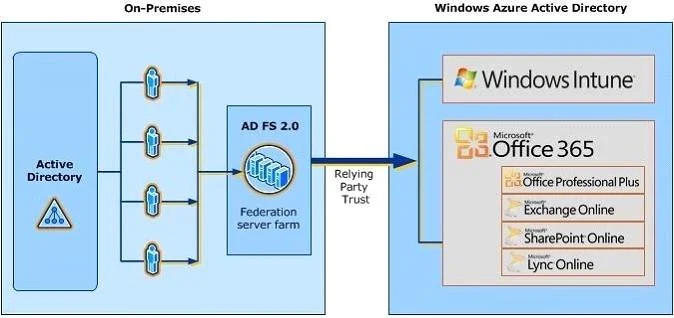
You can deploy a new AD FS infrastructure to provide your Active Directory users, who are logged on to computers located physically on the corporate network or that are logged on remotely to the corporate network, with single sign-on access to one or more Microsoft cloud services using their corporate domain credentials. Once you have deployed your AD FS production environment on-premises, you will need to establish a relying party trust relationship between the AD FS federation server farm and the Windows Azure Active Directory authentication system. This relying party trust acts as a secure channel where authentication tokens can safely pass between your organization and Windows Azure AD in order to facilitate single sign-on access to the Microsoft cloud services that you are Directory Synchronization takes all that information, users, groups, contacts, email addresses, phone numbers, names, etc and synchronizes it from your Active Directory to Office 365. The synchronization is ongoing which allows you to continue to manage users, groups and contacts from your local Active Directory. Directory Synchronization is required if you want to use Active Directory Federation Services (AD FS) Microsoft Online Directory Synchronization can be done using Identity Lifecycle Manager Some of the most common ILM usage scenarios include synchronizing multiple Active Directories, updating a common Exchange Global Address List (GAL) using multiple Active Directory domains or forests, and synchronizing accounts between LDAP implementations or between LDAP and Active Directory. There are also other dyrsync tools.
Topics
Community Discussion
No community discussion yet for this question.