
70-663 · Question #173
A company has an on-premise Exchange Server 2010 SP1 environment. Client computers are joined to an Active Directory Domain Services (AD DS) domain. Some users are hosted in a cloud-based Exchange…
The correct answer is B. a sharing policy. Create a Sharing Policy Applies to: Exchange Server 2010 SP1 You can use sharing policies to control how users in your organization can share calendar and contact information with users outside your Exchange organization, external non- federated organizations, and individuals…
Question
A company has an on-premise Exchange Server 2010 SP1 environment. Client computers are joined to an Active Directory Domain Services (AD DS) domain. Some users are hosted in a cloud-based Exchange Server 2010 SP1 environment. An organization relationship exists between the on-premise and cloud-based environments. Administrative assistants with mailboxes in the on-premise environment must be able to view contacts in cloud-based user mailboxes. You need to recommend a solution that meets the requirement. What should you recommend?
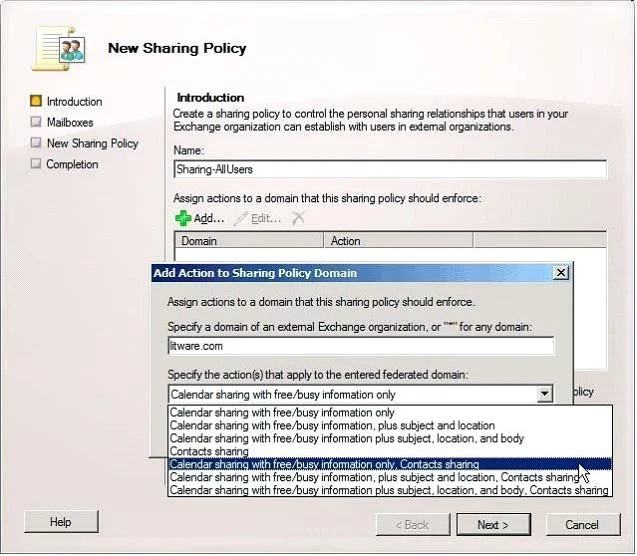
Exhibit
Options
- Aa federation trust
- Ba sharing policy
- Ca remote domain
- Dan Outlook protection rule
How the community answered
(49 responses)- A12% (6)
- B78% (38)
- C8% (4)
- D2% (1)
Explanation
Create a Sharing Policy Applies to: Exchange Server 2010 SP1 You can use sharing policies to control how users in your organization can share calendar and contact information with users outside your Exchange organization, external non- federated organizations, and individuals with Internet access. To configure recipients to use a specific sharing policy, see Apply a Sharing Policy to Mailboxes. For sharing policies between federated organizations, only Microsoft Outlook 2010 and Microsoft Office Outlook Web App users can create sharing invitations.
Topics
Community Discussion
No community discussion yet for this question.