
70-663 · Question #15
You have an Exchange Server 2003 organization. Users access public folders by using Microsoft Office Outlook 2003 and Outlook Web Access. You plan to transition the organization to Exchange Server…
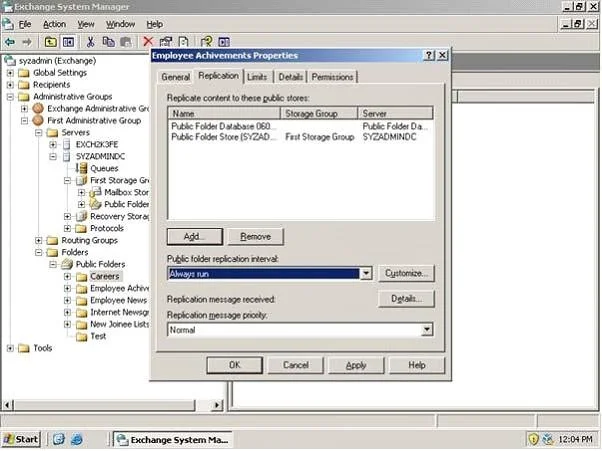
The correct answer is C. Create public folder replicas on an Exchange Server 2010 server. Step 1: Replicating Exchange 2003 PF's to Exchange 2010 To add the Exchange 2010 Public Folder database to the replica list on the Exchange 2003 Server, open the Exchange 2003 System Manager, then expand: Administrative Groups > First Administrative Group > Folders > Public…
Question
You have an Exchange Server 2003 organization. Users access public folders by using Microsoft Office Outlook 2003 and Outlook Web Access. You plan to transition the organization to Exchange Server 2010. You need to ensure that users can access public folders after their mailboxes have been moved to Exchange Server 2010. What should you do?
Exhibit
Options
- AEnable public folder referrals.
- BRun the New Organization Relationship wizard.
- CCreate public folder replicas on an Exchange Server 2010 server.
- DRun the Microsoft Exchange Inter-Organization Application tool from an Exchange Server
How the community answered
(38 responses)- A5% (2)
- B16% (6)
- C74% (28)
- D5% (2)
Explanation
Step 1: Replicating Exchange 2003 PF's to Exchange 2010 To add the Exchange 2010 Public Folder database to the replica list on the Exchange 2003 Server, open the Exchange 2003 System Manager, then expand: Administrative Groups > First Administrative Group > Folders > Public Folders. Now open the property page of each public folder, then click the Replication tab and add the Exchange 2010 to the replica list as shown in the inner figure on the above diagram; Step 2: Moving Exchange 2003 PF's to Exchange 2010 After you confirmed that all the PF have been replicated to the Exchange 2010, you can move all replicas from Exchange 2003 to Exchange 2010. To move all Exchange 2003 replicas to Exchange 2010, which will actually remove the Exchange 2003 replicas from the Exchange 2010 server: \MoveAllReplicas.ps1 -Server "Exchange 2003 Server" -NewServer "Exchange 2010 Server"
Topics
Community Discussion
No community discussion yet for this question.