
350-401 · Question #569
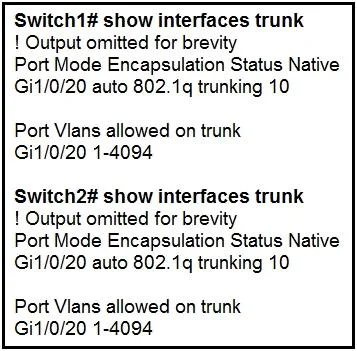
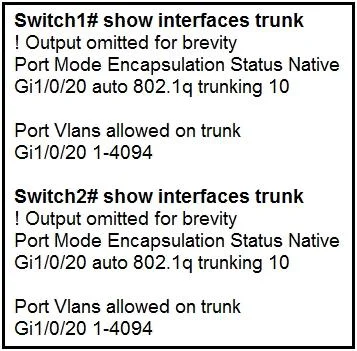
Refer to the exhibit. The trunk does not work over the back-to-back link between Switch1 interface Giq1/0/20 and Switch2 interface Gig1/0/20. Which configuration fixes the problem?
The correct answer is B. Switch2(config)#interface gig1/0/20. The issue of a non-functional trunk between switches is resolved by explicitly configuring 802.1Q trunking mode and encapsulation on both interfaces.
Question
Refer to the exhibit. The trunk does not work over the back-to-back link between Switch1 interface Giq1/0/20 and Switch2 interface Gig1/0/20. Which configuration fixes the problem?
Exhibits
Options
- ASwitch 1(config)#interface gig1/0/20
- BSwitch2(config)#interface gig1/0/20
- CSwitch2(config)#interface gig1/0/20
- DSwitch1(config)#interface gig1/0/20
How the community answered
(28 responses)- A21% (6)
- B61% (17)
- C11% (3)
- D7% (2)
Why each option
The issue of a non-functional trunk between switches is resolved by explicitly configuring 802.1Q trunking mode and encapsulation on both interfaces.
While `dot1q` is correct for encapsulation, `switchport mode dynamic auto` on Switch1 might not form a trunk if the peer is also `dynamic auto` (resulting in access mode) or not explicitly configured for trunking.
The commands `switchport mode trunk` and `switchport trunk encapsulation dot1q` explicitly configure the interface for 802.1Q trunking, ensuring that the link will form a trunk. This addresses common issues where a trunk fails due to mismatched trunking modes (e.g., dynamic auto on both sides resulting in access mode) or incorrect encapsulation types.
Configuring `switchport mode access` on Switch2 will prevent the interface from forming a trunk, as access ports are designed for end devices and carry traffic for a single VLAN.
Configuring `switchport mode access` on Switch1 will prevent the interface from forming a trunk, as access ports are designed for end devices and carry traffic for a single VLAN.
Concept tested: Trunking mode and encapsulation configuration
Source: https://www.cisco.com/c/en/us/td/docs/switches/lan/catalyst3850/software/release/3se/consolidated_guide/b_consolidated_3se_3850_cg/b_consolidated_3se_3850_cg_chapter_01000.html
Topics
Community Discussion
No community discussion yet for this question.