
350-401 · Question #570
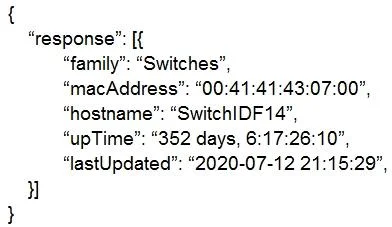
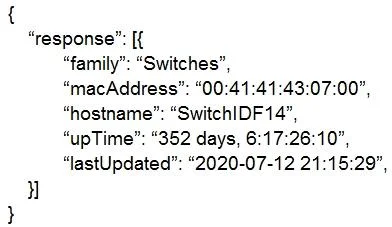
Based on the router's API output in JSON format below, which Python code will display the value of the "hostname" key?
The correct answer is A. json_data = response,json(). Explanation Option A (json_data = response.json()) is correct because the response.json() method is a built-in Requests library function that automatically parses the JSON response from an API call into a Python dictionary, allowing you to then access values like…
Question
Based on the router's API output in JSON format below, which Python code will display the value of the "hostname" key?
Exhibits
Options
- Ajson_data = response,json()
- Bjson_data = json.loads(response.text)
- Cjson_data = json.loads(response.text)
- Djson_data = response.json()
How the community answered
(45 responses)- A93% (42)
- B2% (1)
- C4% (2)
Explanation
Explanation
Option A (json_data = response.json()) is correct because the response.json() method is a built-in Requests library function that automatically parses the JSON response from an API call into a Python dictionary, allowing you to then access values like json_data["hostname"] directly. Note that the answer key shows a comma in option A (response,json()), which appears to be a typo in the question - the intended correct syntax uses a dot (response.json()), making it functionally identical to option D.
Options B and C (json.loads(response.text)) are technically valid Python for parsing JSON but require importing the json module separately and manually extracting the response text first - they are the "longer way" to achieve the same result. Option D (response.json()) is actually syntactically identical to the intended answer A, suggesting a formatting error in the question itself.
Memory Tip: Think of response.json() as the "shortcut" method - when using the Requests library, the response object already has a built-in .json() method, so you don't need to import anything extra. If you see response.json() versus json.loads(response.text), always prefer the cleaner dot-method notation for Requests-based API calls on the exam.
Topics
Community Discussion
No community discussion yet for this question.