
350-401 · Question #1165
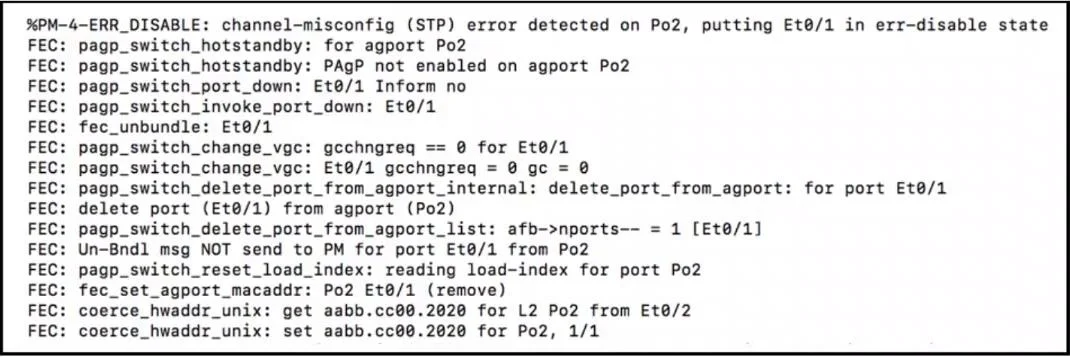
Refer to the exhibit. After unsuccessfully configuring an EtherChannel link, an engineer enables debugging. Which action will resolve the issue?
The correct answer is A. Configure the EtherChannel members in desirable mode. To resolve an EtherChannel issue using PAgP, configuring an interface in desirable mode actively initiates negotiation to form the channel.
Question
Exhibits
Options
- AConfigure the EtherChannel members in desirable mode.
- BSet the EtherChannel to mode on.
- CSet the EtherChannel to mode active.
- DConfigure the EtherChannel members in passive mode.
How the community answered
(40 responses)- A70% (28)
- B5% (2)
- C18% (7)
- D8% (3)
Why each option
To resolve an EtherChannel issue using PAgP, configuring an interface in desirable mode actively initiates negotiation to form the channel.
PAgP desirable mode actively initiates EtherChannel negotiation. If one side is configured in desirable mode, the EtherChannel can form with the other side configured in either desirable or auto mode, which is a common and robust way to establish a PAgP EtherChannel.
Setting the EtherChannel to mode 'on' forces the interface into an EtherChannel without any negotiation, requiring both ends to be in 'on' mode, and will prevent formation if any mismatch in negotiation modes exists.
Setting the EtherChannel to mode 'active' is specific to LACP (Link Aggregation Control Protocol) and is incompatible with PAgP, thus it would not resolve a PAgP-related EtherChannel issue.
Configuring EtherChannel members in passive mode for PAgP puts the interface in a listening state; if both sides are passive, no EtherChannel will form because neither side actively initiates negotiation.
Concept tested: EtherChannel PAgP negotiation modes
Source: https://www.cisco.com/c/en/us/td/docs/switches/lan/catalyst3750x_3560x/software/release/12-2_55_se/configuration/guide/3750x_cg/swethchl.html
Topics
Community Discussion
No community discussion yet for this question.