
350-401 · Question #1166
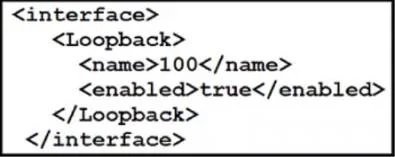
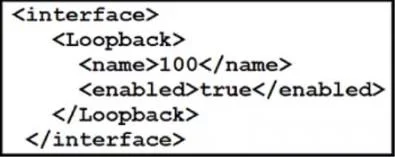
Refer to the exhibit. What is achieved by this code?
The correct answer is A. It unshuts the loopback interface. The 'no shutdown' command, when applied to an interface like a loopback, administratively enables it, bringing the interface up.
Question
Exhibits
Options
- AIt unshuts the loopback interface.
- BIt displays the loopback interface.
- CIt renames the loopback interface.
- DIt deletes the loopback interface.
How the community answered
(28 responses)- A89% (25)
- B4% (1)
- C7% (2)
Why each option
The 'no shutdown' command, when applied to an interface like a loopback, administratively enables it, bringing the interface up.
The `no shutdown` command is used within interface configuration mode to administratively enable an interface, allowing it to become operational and pass traffic if other conditions are met. Applying this to a loopback interface brings it out of a shutdown state.
Displaying an interface typically uses `show` commands, such as `show interface loopback X`, not a configuration command.
Loopback interfaces are identified by their type and number (e.g., Loopback0), and there is no standard Cisco IOS command to rename an interface.
Deleting a loopback interface configuration would involve removing its configuration lines or omitting it entirely, not using a `no shutdown` command.
Concept tested: Cisco IOS interface activation (no shutdown)
Source: https://www.cisco.com/c/en/us/td/docs/ios/interface/configuration/guide/icf_book.html
Topics
Community Discussion
No community discussion yet for this question.