
300-815 · Question #82
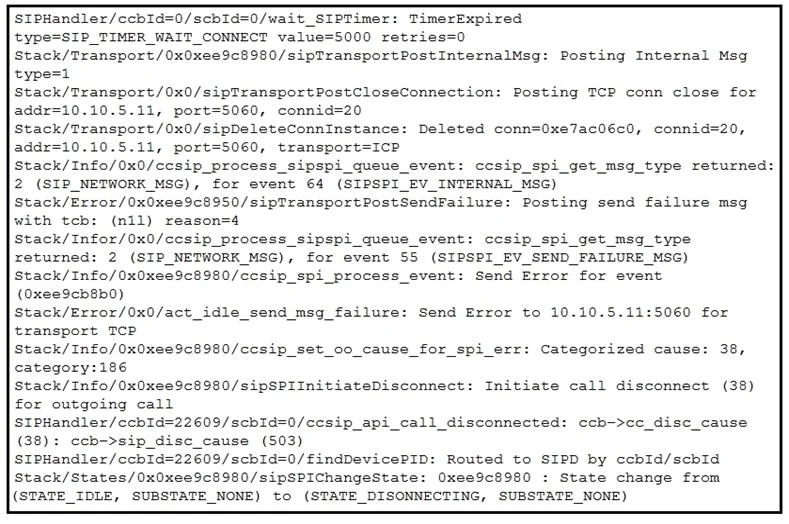
The SIP session refresh timer allows the RTP session to stay active during an active call. The Cisco UCM sends either SIP-INVITE or SIP-UPDATE messages in a regular interval of time throughout the…
The correct answer is C. Change Session Refresh Method on the SIP profile to INVITE. In Cisco UCM, the SIP Profile contains a parameter called 'Session Refresh Method' that determines which SIP message is used for mid-call session keepalives. By default, UCM may use SIP UPDATE for session refresh. To switch to re-INVITE, the engineer must navigate to the SIP…
Question
Exhibit
Options
- AEnable SIP ReMXX Options on the SIP profile.
- BEnable Send send-receive SDP in mid-call INVITE on the SIP profile.
- CChange Session Refresh Method on the SIP profile to INVITE.
- DIncrease Retry INVITE to 20 seconds on the SIP profile.
How the community answered
(32 responses)- A6% (2)
- B16% (5)
- C72% (23)
- D6% (2)
Explanation
In Cisco UCM, the SIP Profile contains a parameter called 'Session Refresh Method' that determines which SIP message is used for mid-call session keepalives. By default, UCM may use SIP UPDATE for session refresh. To switch to re-INVITE, the engineer must navigate to the SIP Profile configuration in UCM and change the 'Session Refresh Method' field from UPDATE to INVITE. This directly controls which method is sent at the session refresh interval, fulfilling the requirement without affecting other SIP behaviors. Option A (SIP ReINVITE Options) is for REINVITE handling, not session refresh method selection. Option B (Send send-receive SDP in mid-call INVITE) controls SDP direction in mid-call INVITEs but does not control which message is used as the session refresher. Option D (Retry INVITE) is a retransmission timer, unrelated to session refresh method selection.
Topics
Community Discussion
No community discussion yet for this question.