
300-810 · Question #11
Refer to the exhibit. Which action allows a remote Cisco Jabber user utilizing Mobile and Remote Access to automatically log in to a Cisco Unity Connection voicemail box via OAuth?
The correct answer is D. Add CUCM under System Settings > Authz Servers in Cisco Unity Connection. For a remote Cisco Jabber user on Mobile and Remote Access (MRA) to automatically log in to Cisco Unity Connection voicemail via OAuth, CUCM must be added as an Authorization Server under System Settings > Authz Servers in Cisco Unity Connection. Unity Connection uses this…
Question
Refer to the exhibit. Which action allows a remote Cisco Jabber user utilizing Mobile and Remote Access to automatically log in to a Cisco Unity Connection voicemail box via OAuth?
Exhibit
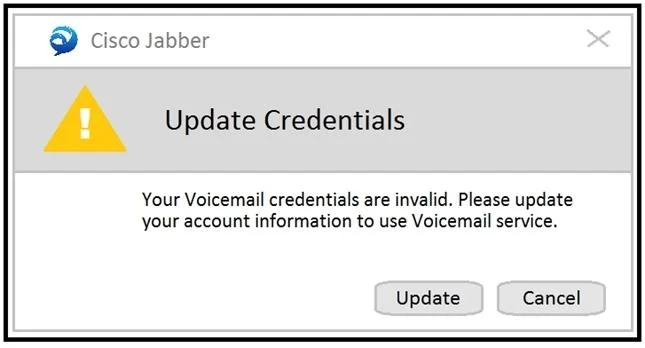
Options
- AAdd CUCM under System Settings > Authz Servers in Cisco Expressway-E.
- BAdd CUCM under System Settings > Authz Servers in Cisco Expressway-C.
- CAdd CUCM under System Settings > Authz Servers in Cisco Unity.
- DAdd CUCM under System Settings > Authz Servers in Cisco Unity Connection.
How the community answered
(33 responses)- A3% (1)
- B15% (5)
- C6% (2)
- D76% (25)
Explanation
For a remote Cisco Jabber user on Mobile and Remote Access (MRA) to automatically log in to Cisco Unity Connection voicemail via OAuth, CUCM must be added as an Authorization Server under System Settings > Authz Servers in Cisco Unity Connection. Unity Connection uses this configuration to validate the OAuth token presented by Jabber, enabling single sign-on (SSO) to voicemail without requiring the user to re-enter credentials. Expressway-C and Expressway-E handle MRA call traversal but are not where the voicemail OAuth authorization server is registered. The configuration must be done on Unity Connection itself.
Topics
Community Discussion
No community discussion yet for this question.