
300-515 · Question #66
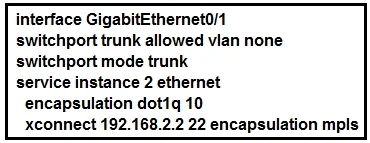
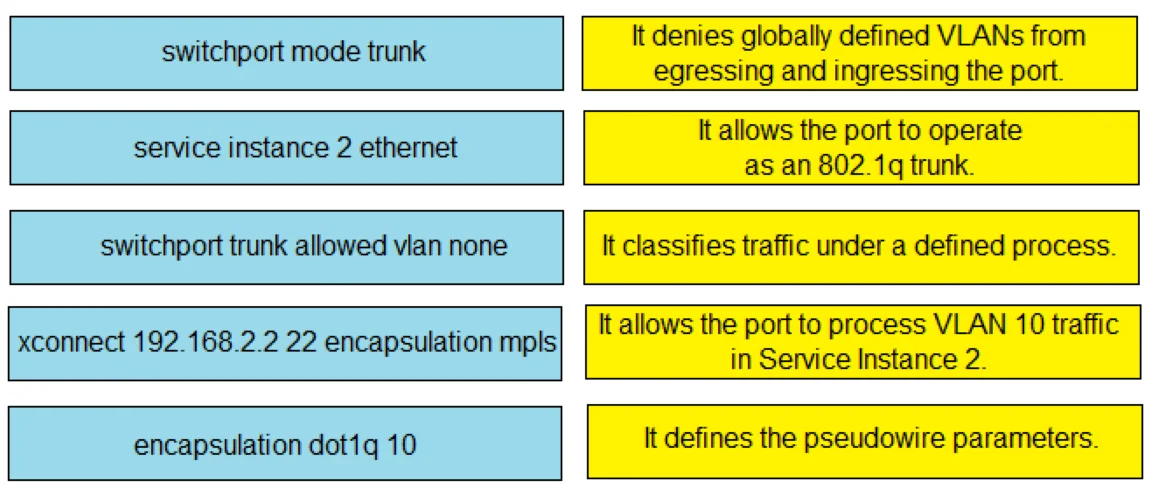
Drag and Drop Question Refer to the exhibit. Drag and drop the EVC configuration items from the left onto the correct descriptions on the right. Answer:
The correct answer is switchport mode trunk; service instance 2 ethernet; switchport trunk allowed vlan none; xconnect 192.168.2.2 22 encapsulation mpls; encapsulation dot1q 10. EVC (Ethernet Virtual Circuit) Configuration - Drag-and-Drop Explained Background EVC is Cisco's framework for mapping Ethernet traffic to MPLS pseudowires (EoMPLS). On a PE (Provider Edge) router, you configure a trunk interface with service instances - each instance matches a…
Question
Drag and Drop Question Refer to the exhibit. Drag and drop the EVC configuration items from the left onto the correct descriptions on the right. Answer:
Exhibits
Answer Area
Drag items
Correct arrangement
- switchport mode trunk
- service instance 2 ethernet
- switchport trunk allowed vlan none
- xconnect 192.168.2.2 22 encapsulation mpls
- encapsulation dot1q 10
Explanation
EVC (Ethernet Virtual Circuit) Configuration - Drag-and-Drop Explained
Background
EVC is Cisco's framework for mapping Ethernet traffic to MPLS pseudowires (EoMPLS). On a PE (Provider Edge) router, you configure a trunk interface with service instances - each instance matches a specific VLAN and cross-connects it to a remote PE via MPLS. This is the configuration being built in this question.
The Distractor (Unused Item)
interface GigabitEthernet0/1 - Not placed anywhere.
The exhibit shows the router already inside the interface context. This item is a red herring. It represents the interface declaration but isn't one of the five EVC configuration items being described on the right.
Item-by-Item Placement
1. switchport mode trunk
Matches: "Configures the interface to carry tagged (802.1Q) frames"
The physical interface must be set to trunk mode before service instances can process VLAN-tagged traffic. Without trunk mode, the interface would operate in access mode and EVC service instances would have no tagged frames to match. This is always the first interface-level command.
Common mistake: Thinking switchport mode trunk isn't needed because service instances "replace" VLAN handling. It's still required to enable 802.1Q frame processing on the port.
2. service instance 2 ethernet
Matches: "Creates the EVC service instance on the interface"
This command enters service instance configuration mode, creating EVC instance #2. All subsequent EVC-specific commands (encapsulation, xconnect) are nested under this instance. The number (2) is the local EVC ID.
Common mistake: Confusing the service instance ID (locally significant) with the VC ID in the xconnect command (22) - they are different identifiers serving different purposes.
3. switchport trunk allowed vlan none
Matches: "Prevents standard Layer 2 VLAN switching on this trunk"
This removes all VLANs from the traditional 802.1Q trunk database. In an EVC deployment, you don't want the switch fabric forwarding tagged frames normally - traffic must be handled exclusively by service instances. Without this, the same VLAN 10 traffic could be switched and cross-connected simultaneously.
Common mistake: Students expect this before service instance since it's a trunk command. However, its purpose is specifically to disable normal VLAN forwarding in support of the EVC model, so it's logically paired with the EVC setup.
4. xconnect 192.168.2.2 22 encapsulation mpls
Matches: "Binds the service instance to a remote PE via an MPLS pseudowire"
This creates the actual pseudowire:
192.168.2.2- loopback IP of the remote PE router22- VC ID (must match on both PE routers)encapsulation mpls- transport method
This command is configured within the service instance (logically subordinate to it) and defines where matched traffic gets forwarded.
Common mistake: Using the remote PE's physical interface IP instead of its loopback. The loopback is used because it's stable and loop-free for LDP/MPLS signaling.
5. encapsulation dot1q 10
Matches: "Specifies which VLAN tag the service instance matches"
This defines the traffic selector for the service instance - frames tagged with VLAN 10 are matched and handed off to the xconnect pseudowire. Without encapsulation, the service instance doesn't know what traffic to capture.
Common mistake: Assuming encapsulation dot1q 10 must come before xconnect in CLI order. In practice, both are sub-commands of the service instance - the exam question is testing conceptual matching, not strict CLI ordering between these two.
Summary Table
| # | Command | Role |
|---|---|---|
| 1 | switchport mode trunk | Enables 802.1Q tagging on the port |
| 2 | service instance 2 ethernet | Creates the EVC service instance |
| 3 | switchport trunk allowed vlan none | Disables normal VLAN switching |
| 4 | xconnect 192.168.2.2 22 encapsulation mpls | Creates the MPLS pseudowire |
| 5 | encapsulation dot1q 10 | Defines the VLAN-to-instance mapping |
| - | interface GigabitEthernet0/1 | Context shown in exhibit - not placed |
Topics
Community Discussion
No community discussion yet for this question.