
300-515 · Question #169
Refer to the exhibit. OSPF routers R1 and R2 are connected via a 1G Ethernet link. R1 has IP address 10.1.1.1/24 on its Gi0/0/1 interface, and R2 has IP address 10.1.1.2/24 on its Gi0/0/1 interface…
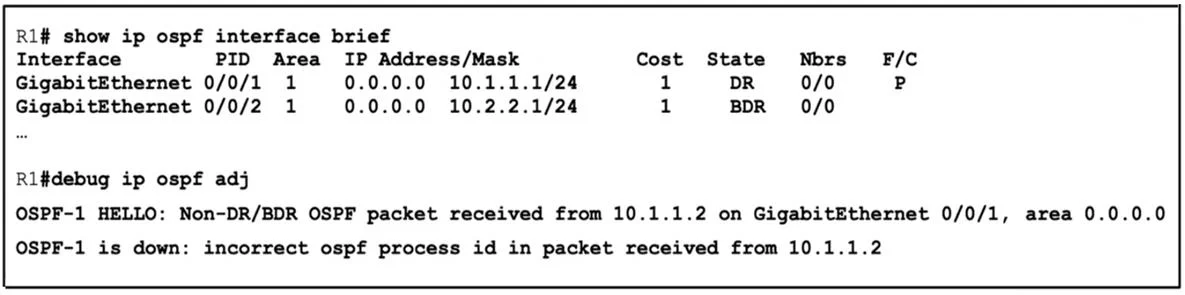
The correct answer is B. Configure router ospf 1 under the global configuration on R2. The debug on R1 reports “incorrect ospf process id in packet received,” meaning R2 is sending hellos from a different (or absent) OSPF instance. Enabling router ospf 1 globally on R2 starts the same process-ID that R1 is running, so the packets are accepted and the adjacency…
Question
Refer to the exhibit. OSPF routers R1 and R2 are connected via a 1G Ethernet link. R1 has IP address 10.1.1.1/24 on its Gi0/0/1 interface, and R2 has IP address 10.1.1.2/24 on its Gi0/0/1 interface OSPF with process ID 1 is configured on both routers, and both routers are in the same OSPF area. However, R1 cannot establish an OSPF adjacency with R2. The network engineer who is troubleshooting the problem found these log messages on R1. Which action must the engineer take to resolve the issue?
Exhibit
Options
- AConfigure ip ospf network non-broadcast under Gi0/0/1 on R2
- BConfigure router ospf 1 under the global configuration on R2
- CConfigure no passive-interface under Gi0/0/1 on R1
- DConfigure prefix-suppression under the global configuration on R1
How the community answered
(42 responses)- A7% (3)
- B79% (33)
- C2% (1)
- D12% (5)
Explanation
The debug on R1 reports “incorrect ospf process id in packet received,” meaning R2 is sending hellos from a different (or absent) OSPF instance. Enabling router ospf 1 globally on R2 starts the same process-ID that R1 is running, so the packets are accepted and the adjacency forms.
Topics
Community Discussion
No community discussion yet for this question.