
300-510 · Question #255
SIMULATION Guidelines This is a lab item in which tasks will be performed on virtual devices. - Refer to the Tasks tab to view the tasks for this lab item. - Refer to the Topology tab to access the…
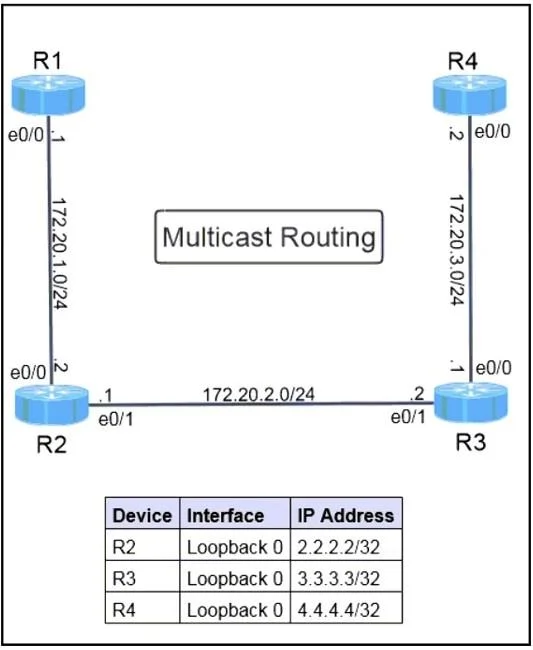
The correct answer is D. Configure area 2 nssa translate type7 no-suppress-fa under the OSPF configuration on router R2. In an OSPF NSSA (Not-So-Stubby Area), Type-7 LSAs are generated inside the NSSA and must be translated to Type-5 LSAs by the ABR (Area Border Router) for propagation to the rest of the OSPF domain. By default, when an NSSA ABR performs this translation, it suppresses the…
Question
Exhibit
Options
- AConfigure area 2 nssa no-summary under the global router configuration on router R2.
- BConfigure default-information originate under the OSPF configuration on router R4.
- CConfigure ip route 0.0.0.0 0.0.0.0 null0 under the global router configuration on router R4.
- DConfigure area 2 nssa translate type7 no-suppress-fa under the OSPF configuration on router R2.
How the community answered
(21 responses)- A5% (1)
- B14% (3)
- C10% (2)
- D71% (15)
Explanation
In an OSPF NSSA (Not-So-Stubby Area), Type-7 LSAs are generated inside the NSSA and must be translated to Type-5 LSAs by the ABR (Area Border Router) for propagation to the rest of the OSPF domain. By default, when an NSSA ABR performs this translation, it suppresses the original Forwarding Address (FA) and replaces it with 0.0.0.0. This suppression breaks multicast RPF (Reverse Path Forwarding) checks because multicast routing relies on the forwarding address to determine the correct RPF interface. The command 'area 2 nssa translate type7 no-suppress-fa' on R2 (the NSSA ABR) preserves the original forwarding address when translating Type-7 to Type-5 LSAs, ensuring correct multicast RPF lookups. Option A (no-summary) would make it a Totally NSSA, which blocks external routes rather than fixing the FA issue. Options B and C address default route injection but do not resolve the forwarding address suppression problem critical to multicast operations.
Topics
Community Discussion
No community discussion yet for this question.