
220-1201 · Question #160
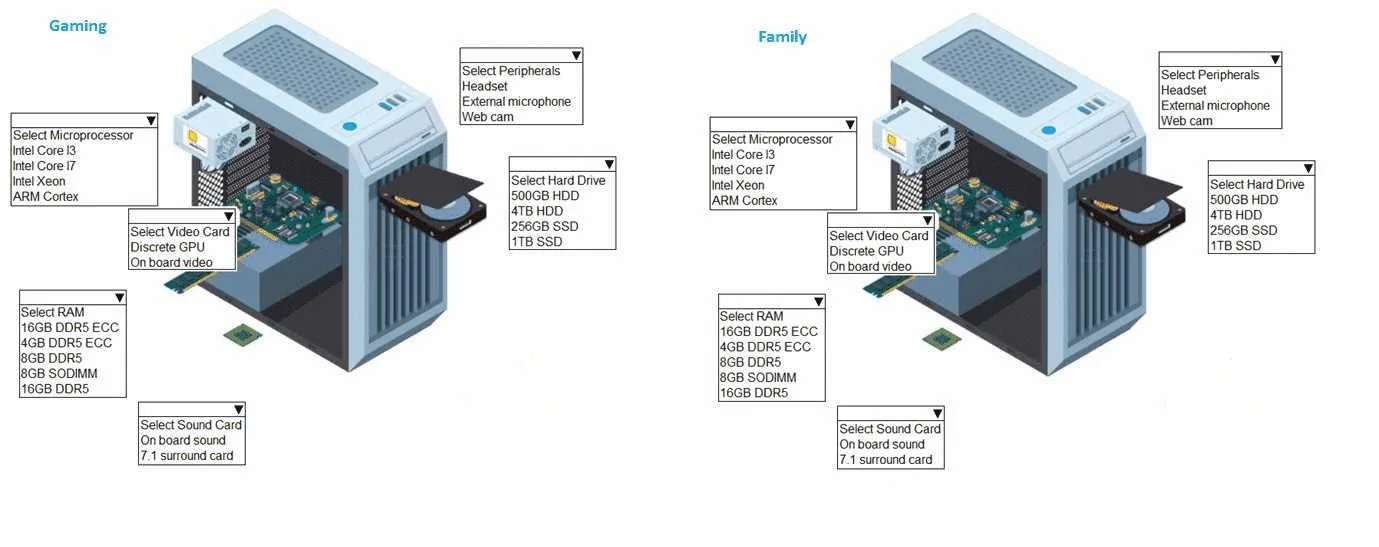
SIMULATION 1 A customer has contacted you about building two new desktops. The first desktop will be a gaming workstation. The customer requirements include: - Playing the newest games at a high…
The question requires selecting appropriate computer components for two distinct desktop builds – a high-performance gaming workstation and a cost-effective family workstation – based on specific user requirements.
Question
SIMULATION 1 A customer has contacted you about building two new desktops. The first desktop will be a gaming workstation. The customer requirements include:
- Playing the newest games at a high frame rate
- Fast game load times
- Enough storage to have several games installed at once
- High-end audio
- No concern about cost
- Running the current Windows OS
The second workstation will be a family workstation. The requirements include:
- Capability for word processing, videoconferencing, and basic web
surfing
- Minimal cost, as long as it meets the requirements
- Running the current Windows OS
INSTRUCTIONS Use the drop-down menus to select the appropriate component for each category, based on the above requirements. If at any time you would like to bring back the initial state of the simulation, please click the Reset All button. Answer:
Exhibit
Explanation
The question requires selecting appropriate computer components for two distinct desktop builds – a high-performance gaming workstation and a cost-effective family workstation – based on specific user requirements.
Approach. The correct approach involves analyzing the requirements for each workstation type and selecting the most appropriate component from the available options in each category, prioritizing performance for the 'Gaming' workstation and cost-effectiveness for the 'Family' workstation.
For the Gaming Workstation (High performance, No cost concern):
- Microprocessor: Intel Core i7 - Provides high processing power essential for modern gaming and multitasking.
- Video Card: Discrete GPU - Absolutely necessary for achieving high frame rates and rendering complex graphics in modern games.
- RAM: 16GB DDR5 - Offers ample capacity and speed for demanding games and ensures smooth performance, aligning with 'newest games' and 'no concern about cost'.
- Sound Card: 7.1 surround sound card - Directly addresses the 'high-end audio' requirement for an immersive gaming experience.
- Hard Drive: 1TB SSD - Meets the 'fast game load times' requirement (SSD) and provides sufficient storage for 'several games'.
- Peripherals: Headset - Optimal for high-end audio and communication in gaming, aligning with the 'high-end audio' requirement.
For the Family Workstation (Basic tasks, Minimal cost):
- Microprocessor: Intel Core i3 - Sufficient for word processing, web surfing, and videoconferencing, offering good performance at a lower cost.
- Video Card: On board video - Adequate for basic desktop tasks and is the most cost-effective option, as a discrete GPU is unnecessary.
- RAM: 8GB DDR5 - Provides enough memory for current Windows OS and typical family applications, balancing performance and cost. 4GB might be too restrictive, 16GB is overkill.
- Sound Card: On board sound - Perfectly sufficient for basic audio needs and the most cost-effective solution.
- Hard Drive: 500GB HDD - Offers ample storage for documents and basic files at a minimal cost. An SSD, while faster, would increase the cost beyond 'minimal'.
- Peripherals: Web cam - Directly addresses the 'videoconferencing' requirement for basic communication.
Common mistakes.
- common_mistake. Common mistakes stem from misinterpreting the requirements or lacking knowledge of component suitability.
For the Gaming Workstation:
- Choosing HDD (e.g., 500GB HDD, 4TB HDD): Fails to meet the 'fast game load times' requirement, as HDDs are significantly slower than SSDs.
- Choosing On board video: Will result in extremely poor gaming performance and low frame rates, directly failing the 'playing newest games at a high frame rate' requirement.
- Choosing Intel Core i3 or ARM Cortex for Microprocessor: These lack the processing power required for high-end gaming.
- Choosing On board sound: Fails the 'high-end audio' requirement.
- Choosing 4GB or 8GB RAM: While 8GB might run some games, 16GB is preferred for 'newest games' and 'no concern about cost' to avoid bottlenecks.
For the Family Workstation:
- Choosing high-end components (e.g., Intel Core i7, Discrete GPU, 1TB SSD, 7.1 surround sound card): These choices would significantly increase the cost, failing the 'minimal cost' requirement for basic tasks.
- Choosing no Web cam for Peripherals: This would fail the 'videoconferencing capability' requirement.
- Choosing 4GB RAM: While minimal, it might struggle with current Windows OS combined with multiple applications like videoconferencing, potentially not adequately meeting 'capability for word processing, videoconferencing, and basic web surfing' without excessive slowdowns.
Concept tested. This question tests the understanding of computer hardware components (CPU, GPU, RAM, Storage, Sound, Peripherals), their specifications, performance characteristics, and cost implications. It assesses the ability to match technical specifications to specific user requirements and budget constraints, demonstrating practical knowledge for building or recommending appropriate computer systems.
Topics
Community Discussion
No community discussion yet for this question.