
220-1201 · Question #161
SIMULATION 2 A small ISP has hired a new technician Joe, the new technician, is being trained to configure customers* home networks. The trailing instructor gives me technician a starter kit with…
Simulation 2 Explanation: Building a Home Network Overall Goal You're building a signal path from the ISP's infrastructure into the home, converting that signal for use by a computer (internet) and a phone (dial tone). Each device in the chain converts or routes the signal…
Question
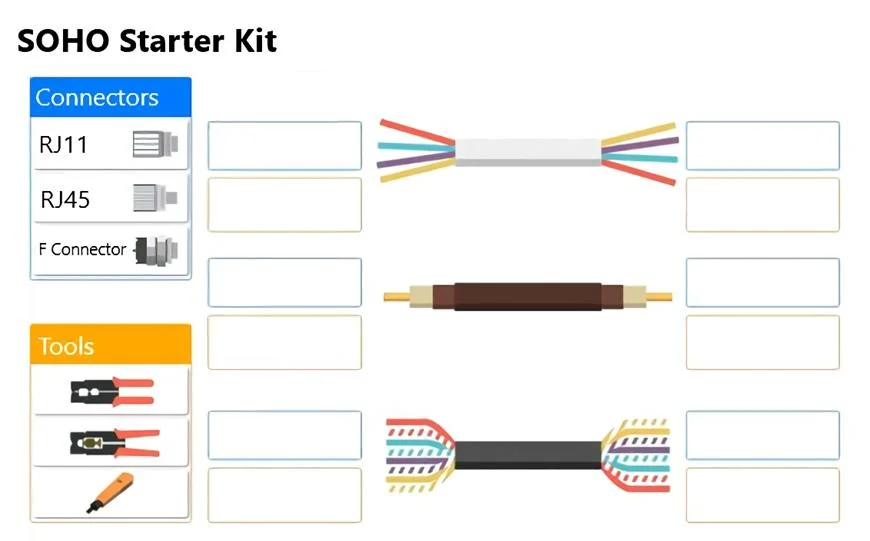
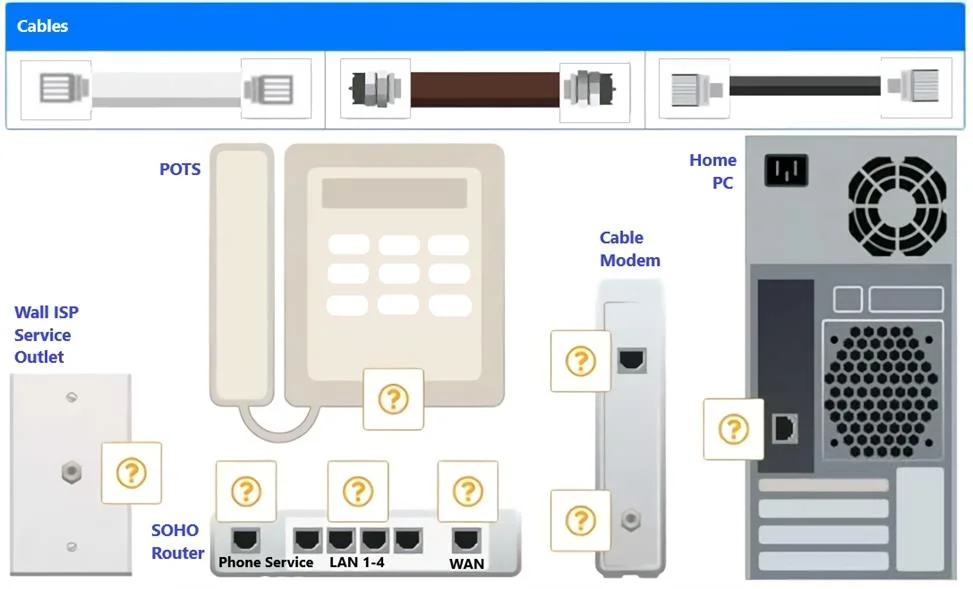
SIMULATION 2 A small ISP has hired a new technician Joe, the new technician, is being trained to configure customers* home networks. The trailing instructor gives me technician a starter kit with cables, cable ends, and other network equipment and asks mm to build a working network. The computer should be connected to have internet connectivity and the phone should be connected to have a dial tone. INSTRUCTIONS Use the appropriate cables. cable ends, tools and equipment to configure the network and connect an components accordingly. There are 3 steps and the simulation starts on step 1. If at any time you would like to bring back the initial state of the simulation, please click the Reset All button. Step 1 Step 2 Answer:
Exhibits
Explanation
Simulation 2 Explanation: Building a Home Network
Overall Goal
You're building a signal path from the ISP's infrastructure into the home, converting that signal for use by a computer (internet) and a phone (dial tone). Each device in the chain converts or routes the signal - order matters because each device depends on the previous one to function.
Step-by-Step Breakdown
Step 1 - Wall Outlet -> Cable Modem (Coaxial cable with F-connectors)
The ISP delivers its signal over coaxial cable. The wall outlet is where that signal enters the home. The cable modem's job is to demodulate (decode) the ISP's signal into standard Ethernet. Without this step, nothing downstream gets internet - the modem is the gateway between the ISP's network and your local network.
- Cable type: Coaxial with F-type connectors (the screw-on barrel connectors)
- Skipping this: No internet signal enters the home at all
Step 2 - Cable Modem -> Router WAN port (RJ45 Ethernet cable)
The modem now outputs a raw internet connection, but only one device can use it directly. The router takes that single connection and shares it across multiple devices. It also handles NAT (Network Address Translation), DHCP for local IPs, and phone services. You must plug into the WAN port (not a LAN port) - the WAN port is what faces the internet.
- Cable type: RJ45 Ethernet (straight-through)
- Skipping this: Internet is trapped at the modem; only one device could connect, and phone service wouldn't work
- Wrong port (LAN instead of WAN): Router won't get internet from the modem
Step 3 - Router LAN port -> Home PC (RJ45 Ethernet cable)
The router's LAN ports distribute the shared internet connection to local devices. Plugging the PC into any LAN port (typically labeled 1-4) gives it a local IP from the router's DHCP server and internet access through NAT.
- Cable type: RJ45 Ethernet (straight-through)
- Skipping this: PC has no network connection
Step 4 - Router Phone port -> Phone (RJ11 phone cable)
Many SOHO routers include a built-in VoIP ATA (Analog Telephone Adapter), providing a phone port labeled "Phone" or "Tel." This converts the internet connection into an analog signal the standard phone can use, giving it a dial tone. This only works because the router is already connected to the internet (Steps 1-2).
- Cable type: RJ11 (the smaller, 2-4 wire phone connector - narrower than RJ45)
- Skipping Steps 1-2 first: Phone port has no internet signal to derive a dial tone from
What Goes Wrong Out of Order
| Mistake | Result |
|---|---|
| Plugging modem into router LAN port | Router doesn't recognize it as internet; no WAN connectivity |
| Using RJ11 where RJ45 is needed | Physical mismatch - cable won't seat properly |
| Connecting phone before router has internet | Dial tone never comes up (no upstream signal) |
| Using coax without F-connectors | Poor signal / no connection at modem input |
Memory Tip
Think of it as a chain of translation:
ISP signal -> Modem (coax->Ethernet) -> Router (routes to everyone) -> PC (RJ45) / Phone (RJ11)
Each link in the chain speaks a different "language" - coax, Ethernet, phone line. The equipment translates between them in sequence. You always work from the wall outward.
Also remember the connector size rule: RJ45 is wider (8 pins, data), RJ11 is narrower (2-4 pins, voice). Mixing them up is a common exam trap.
Topics
Community Discussion
No community discussion yet for this question.