
200-301 · Question #685
Lab Simulation 3 Guidelines This is a lab item in which tasks will be performed on virtual devices. - Refer to the Tasks tab to view the tasks for this lab item. - Refer to the Topology tab to…
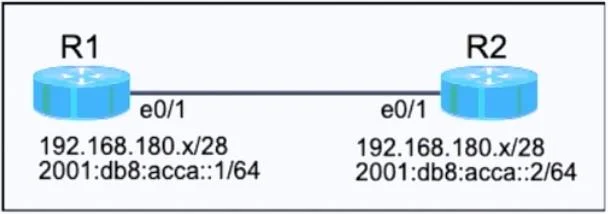
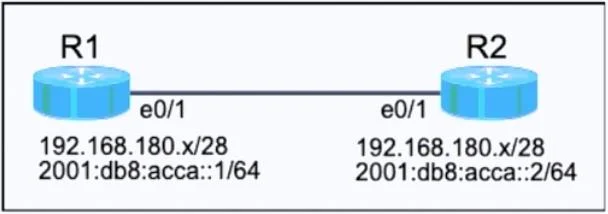
Lab Explanation: Dual-Stack (IPv4 + IPv6) Router Configuration Overall Goal The task establishes a dual-stack link between R1 and R2 using their Ethernet0/1 interfaces. "Dual-stack" means each interface carries both an IPv4 and an IPv6 address simultaneously - a common…
Question
Exhibits
Explanation
Lab Explanation: Dual-Stack (IPv4 + IPv6) Router Configuration
Overall Goal
The task establishes a dual-stack link between R1 and R2 using their Ethernet0/1 interfaces. "Dual-stack" means each interface carries both an IPv4 and an IPv6 address simultaneously - a common real-world design during the IPv4-to-IPv6 transition. The correct approach is to calculate the right subnets first, then assign addresses to each router, enable the interfaces, and save.
Step-by-Step Reasoning
Subnetting Math (do this before touching any router)
IPv4 - Finding the next /28:
A /28 mask = 255.255.255.240. Each /28 block has 16 addresses (14 usable hosts).
| Subnet # | Network Address | Usable Range | Broadcast |
|---|---|---|---|
| 1st | 192.168.180.0 | .1 - .14 | .15 |
| 2nd | 192.168.180.16 | .17 - .30 | .31 |
| 3rd | 192.168.180.32 | .33 - .46 | .47 |
Since 192.168.180.0/28 is unavailable, the next usable subnet is 192.168.180.16/28.
- R1 gets the first usable host:
.17 - R2 gets the last usable host:
.30
IPv6 - Finding the first /64:
The parent prefix is 2001:0db8:acca::/48. Subnetting to /64 means the 4th hextet becomes the subnet ID. The first /64 is simply 2001:db8:acca:0000::/64, written as 2001:db8:acca::/64. R1 and R2 get ::1 and ::2 within that subnet.
R1 Configuration
enable                          # Enter privileged EXEC mode
configure terminal              # Enter global config mode
ipv6 unicast-routing            # Enable IPv6 routing (off by default on IOS)
interface ethernet0/1           # Select the correct interface
 ip address 192.168.180.17 255.255.255.240   # First usable host in .16/28
 ipv6 address 2001:db8:acca::1/64            # First host in the /64
 no shutdown                    # Bring the interface up (default is shutdown)
end
copy running-config startup-config           # Persist to NVRAM
R2 Configuration
enable
configure terminal
ipv6 unicast-routing
interface ethernet0/1
 ip address 192.168.180.30 255.255.255.240   # Last usable host in .16/28
 ipv6 address 2001:db8:acca::2/64
 no shutdown
end
copy running-config startup-config
Why Each Step Matters
| Step | Why It's Necessary | What Breaks If Skipped |
|---|---|---|
ipv6 unicast-routing | IOS routers do not forward IPv6 packets by default | IPv6 addresses can be assigned but traffic won't route; pings fail |
ip address with correct mask | Places the interface in the right subnet | If masks differ between routers, they're in different subnets and can't communicate |
ipv6 address | Assigns the link-local + global unicast address | No IPv6 connectivity, ping6 fails |
no shutdown | Ethernet interfaces default to administratively down | Interface stays down; no traffic passes even with correct addressing |
copy running-config startup-config | Writes RAM config to NVRAM | Config is lost on reload - the exam checks saved config |
Order matters: You must enter interface config mode before assigning addresses, and no shutdown must come after the address is assigned so the interface comes up cleanly.
Common Mistakes
- Using
.16or.31as a host address - those are the network and broadcast addresses, not usable hosts. - Forgetting
ipv6 unicast-routing- this is the single most common reason IPv6 pings fail on IOS. - Wrong subnet - assigning from the first /28 (
.0) instead of the second (.16) fails because that block is unavailable/already used. copy running-startup config(typo in original answer) - the correct command iscopy running-config startup-config.
Memory Tip
"Next block, first/last, save it."
- Next block = skip the unavailable /28, use the next one
- First host to R1, last host to R2 = alphabetical order (R1 -> first, R2 -> last)
- Save it =
copy run startbefore clicking Next or the config is gone
For IPv6: expanding 2001:0db8:acca::/48 to /64 just adds a fourth group of zeros - the first subnet is always ::0000::/64, so hosts start at ::1.
Topics
Community Discussion
No community discussion yet for this question.