
200-301 · Question #686
Lab Simulation 4 Guidelines This is a lab item in which tasks will be performed on virtual devices - Refer to the Tasks tab to view the tasks for this lab item. - Refer to the Topology tab to access…
Lab Simulation 4: Static Routing Explanation Overall Goal The lab establishes IP connectivity across four routers without dynamic routing protocols (no OSPF, EIGRP, etc.). Every router must be explicitly told how to reach remote networks. The key challenge: routing is…
Question
Exhibits
Explanation
Lab Simulation 4: Static Routing Explanation
Overall Goal
The lab establishes IP connectivity across four routers without dynamic routing protocols (no OSPF, EIGRP, etc.). Every router must be explicitly told how to reach remote networks. The key challenge: routing is bidirectional - for a ping to succeed, both the request AND the reply must have a valid path.
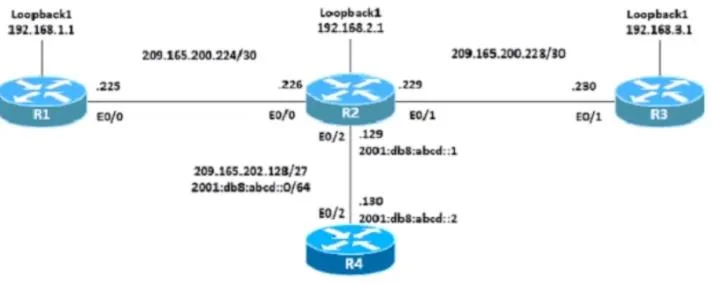
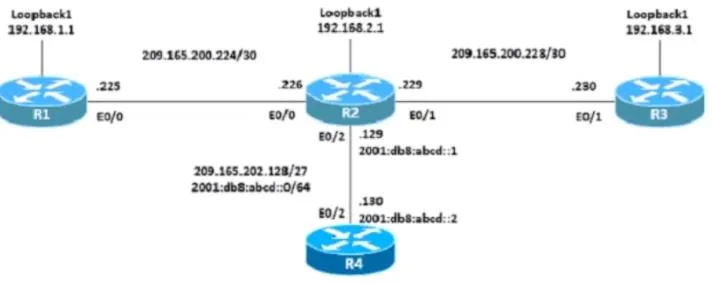
Topology Context (inferred from the IP addresses)
R3 --- R2 --- R1 (Loopback: 192.168.1.1)
        |
        R4
Key interfaces/IPs:
- R3's exit IP:
209.165.200.230(source of the ping) - R3->R2 link: R2's side is
209.165.200.229 - R2->R1 link: R1's side is
209.165.200.225, R2's side is209.165.200.226 - R2->R4 link: R4's side is
209.165.202.130/2001:db8:abcd::2
Task 1: Static Host Routes - R3 to R1's Loopback
Why host routes? A host route uses mask 255.255.255.255 (or /32) to match exactly one IP address - in this case, R1's loopback 192.168.1.1. This is more specific than a network route and is the precise tool when you need reachability to a single address.
Step 1 - R3:
R3(config)#ip route 192.168.1.1 255.255.255.255 209.165.200.229
- Destination: R1's loopback (
192.168.1.1/32) - Next-hop:
209.165.200.229- R2's interface on the R3-R2 link - This tells R3: "To reach 192.168.1.1, send traffic to R2."
- Without this: R3 has no idea where 192.168.1.1 is. The ping never leaves R3.
Step 2 - R2:
R2(config)#ip route 192.168.1.1 255.255.255.255 209.165.200.225
- R2 receives the packet from R3 and must forward it onward to R1.
- Next-hop:
209.165.200.225- R1's interface on the R2-R1 link - Without this: The packet arrives at R2 and is dropped - R2 has no route to 192.168.1.1.
Step 3 - R1:
R1(config)#ip route 209.165.200.230 255.255.255.255 209.165.200.226
- This is the return path. R1 receives the ping from source IP
209.165.200.230(R3's exit address) and must know how to reply. - Next-hop:
209.165.200.226- R2's interface on the R1-R2 link - Without this: R1 receives the ping but cannot reply - it drops the reply because it has no route back to
209.165.200.230. The ping shows.!!!!(first packet lost, ICMP unreachable or timeout, then R1 learns the path - but in static routing it never learns; you'd see....without this route).
The
R3#ping 192.168.1.1result.!!!!confirms: the first packet was lost (while ARP resolved), then 4 succeeds. This is normal behavior.
Order matters: You must configure R3 first (traffic source), then R2 (transit), then R1 (return path). Though the routes don't depend on each other at config time, the question specifies this order for logical clarity and to match how a packet travels.
Task 2: IPv4 Default Route on R2 -> R4
R2(config)#ip route 0.0.0.0 0.0.0.0 209.165.202.130
0.0.0.0 0.0.0.0is the default route - it matches any destination not covered by a more specific route (the "gateway of last resort").- Next-hop:
209.165.202.130- R4's IPv4 address on the R2-R4 link - This tells R2: "For any unknown IPv4 destination, forward to R4."
- Without this: Traffic destined for networks beyond R4 (e.g., the internet) would be dropped at R2 with "no route to host."
Task 3: IPv6 Default Route on R2 -> R4
R2(config)#ipv6 route ::/0 2001:db8:abcd::2
- IPv6 equivalent of the default route.
::/0means "all IPv6 addresses" (prefix length 0 = match everything). - Next-hop:
2001:db8:abcd::2- R4's IPv6 address - IPv4 and IPv6 routing tables are completely separate on Cisco IOS. Configuring an IPv4 default route does nothing for IPv6 traffic.
- Without this: All IPv6 traffic from R2 toward R4 is dropped, even though IPv4 works fine.
What Goes Wrong If Steps Are Skipped
| Skipped Step | Symptom |
|---|---|
| R3's host route | Ping never initiates - R3 drops packet immediately |
| R2's host route | Ping dies at R2 - R3 sees only timeouts |
| R1's return route | R3 sees all timeouts - packet arrives at R1 but reply is dropped |
| IPv4 default route | R2 can't reach anything past R4 for IPv4 |
| IPv6 default route | R2 can't reach anything past R4 for IPv6 (IPv4 still works) |
Memory Tips
-
Bidirectional routing: Every ping needs a forward path AND a return path. Always ask: "Can the reply find its way back?"
-
Host route = /32: When you see
255.255.255.255, think "exactly one IP address." It's the most specific route possible. -
Default route mnemonic:
0.0.0.0 0.0.0.0= "zero knowledge, send it somewhere else." In IPv6:::/0= same idea. -
Separate routing tables: IPv4 uses
ip route, IPv6 usesipv6 route. They never mix - if a task involves both, you need both commands. -
Verify with ping: The
.!!!!pattern on Cisco means the first probe timed out (normal for ARP) but subsequent probes succeeded - connectivity is working.
Topics
Community Discussion
No community discussion yet for this question.