
200-301 · Question #1667
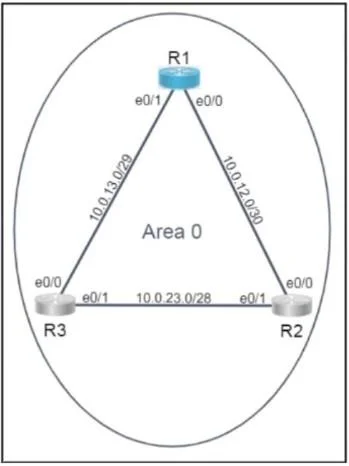
Lab Simulation 53 Please use the "Tasks" and "Topology" tabs to complete this lablet. Topology Tasks Refer to the topology. All physical cabling is in place. Routers R2 and R3 are inaccessible…
OSPF Lab Simulation 53 - Explanation --- Overall Goal Configure OSPF on R1 so it: 1. Discovers R2 and R3 as neighbors and exchanges routing information 2. Always wins the DR election on every link in Area 0 OSPF is a link-state routing protocol. Routers on a shared segment…
Question
Exhibits
Explanation
OSPF Lab Simulation 53 - Explanation
Overall Goal
Configure OSPF on R1 so it:
- Discovers R2 and R3 as neighbors and exchanges routing information
- Always wins the DR election on every link in Area 0
OSPF is a link-state routing protocol. Routers on a shared segment elect a Designated Router (DR) to reduce flooding overhead - instead of every router talking to every other router, all routers form adjacencies with the DR. Making R1 the DR ensures centralized, predictable control of the segment.
Step-by-Step Breakdown
Step 1: router ospf 10
Starts the OSPF process with ID 10. The process ID is locally significant - it doesn't need to match on R2/R3, but the lab explicitly requires 10. Without this, OSPF never initializes.
Step 2: router-id <Loopback0-IP>
Manually sets the Router ID (RID). By default, IOS picks the highest loopback IP or highest active interface IP - but this is non-deterministic. Explicitly setting it to Lo0 ensures a stable, predictable RID that survives interface flaps. The RID uniquely identifies R1 in the OSPF domain.
If skipped: IOS auto-selects a RID, which may change if interfaces go up/down, causing OSPF to re-converge unexpectedly.
Steps 3-5: network <prefix> <wildcard> area 0
The network command does two things:
- Enables OSPF on the matching interface(s)
- Advertises that prefix into Area 0
The wildcard mask (inverted subnet mask) scopes which interfaces activate OSPF. Using exact wildcard masks (e.g., 0.0.0.3 for a /30) ensures only the intended interface is matched. A loose wildcard like 0.0.0.255 could accidentally activate OSPF on unintended interfaces.
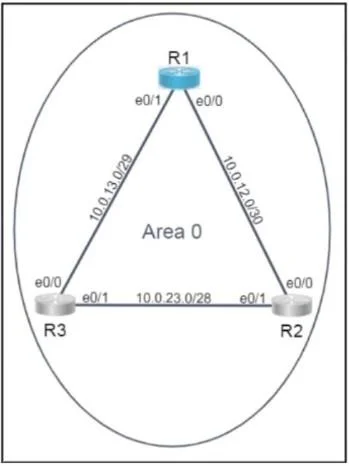
| Network | Wildcard | Subnet | Connects to |
|---|---|---|---|
| 10.0.12.0 | 0.0.0.3 | /30 | R2 |
| 10.0.13.0 | 0.0.0.7 | /29 (note: larger) | R3 |
| 10.0.23.0 | 0.0.0.15 | /28 | R2-R3 link |
If skipped: R1 won't send Hello packets on that interface - no neighbor relationship forms with R2 or R3 on that segment.
Step 6: network <Loopback0-IP> 0.0.0.0 area 0
Advertises the loopback into OSPF. The 0.0.0.0 wildcard matches exactly that one IP. Loopbacks are important for reachability to R1 itself (used for management, BGP peering, etc.).
If skipped: The loopback network is unreachable via OSPF from R2/R3.
Steps 7-10: ip ospf priority 255 on e0/0 and e0/1
OSPF DR election is based on priority (higher wins), then RID (tiebreaker). The default priority is 1. Setting R1's interfaces to 255 (maximum) guarantees R1 wins the DR election on every segment, regardless of what R2/R3's priorities are.
If skipped: R1 competes with default priority 1 and may lose the DR election to R2 or R3 - especially if they have higher RIDs. The lab requirement would fail.
Critical ordering note: OSPF DR elections occur when Hello packets are first exchanged. If R1 joins a segment after a DR is already elected, it won't preempt - OSPF DR elections are non-preemptive. Setting priority before OSPF forms adjacencies (or clearing OSPF process after) ensures R1 wins. In a real scenario, you'd use
clear ip ospf processto force re-election.
What Goes Wrong if Steps Are Out of Order
- Setting priority after neighbors are already adjacent won't change the existing DR - you'd need to reset the OSPF process.
- Configuring
networkstatements before setting the router-id causes IOS to auto-assign a RID, which then can't be changed without resetting OSPF.
Memory Tips
"OSPF: ID first, Networks second, Priority third"
- Router ID -> stable identity before anything else
- Network statements -> activate interfaces and advertise prefixes
- Priority 255 -> dominate DR election on all links
Wildcard = 255.255.255.255 minus subnet mask
- /30 mask = 255.255.255.252 -> wildcard = 0.0.0.3
- /29 mask = 255.255.255.248 -> wildcard = 0.0.0.7
- /28 mask = 255.255.255.240 -> wildcard = 0.0.0.15
Topics
Community Discussion
No community discussion yet for this question.