
010-151 · Question #24
Refer to the exhibit. Which option should you select to get the output of the show tech-support detail command for the Cisco UCS B-Series blade?
The correct answer is B. B - chassis. To collect show tech-support detail output for a Cisco UCS B-Series blade server, you must select the chassis scope because B-Series blades reside inside a UCS chassis.
Question
Refer to the exhibit. Which option should you select to get the output of the show tech-support detail command for the Cisco UCS B-Series blade?
Exhibit
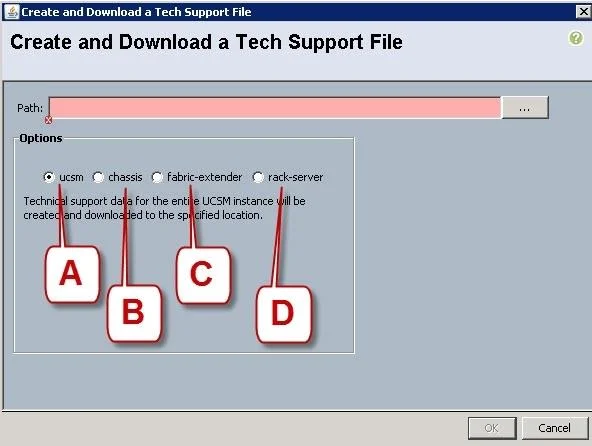
Options
- AA - ucsm
- BB - chassis
- CC - fabric-extender
- DD - rack-server
How the community answered
(25 responses)- A4% (1)
- B72% (18)
- C8% (2)
- D16% (4)
Why each option
To collect show tech-support detail output for a Cisco UCS B-Series blade server, you must select the chassis scope because B-Series blades reside inside a UCS chassis.
The ucsm option collects UCS Manager application-level logs and software state, not blade hardware diagnostics.
Cisco UCS B-Series blade servers are physically installed inside a UCS 5100 Series blade server chassis, so the chassis option in the tech-support collection tool gathers diagnostic data for all components within the chassis, including the blade servers themselves and their associated I/O modules.
The fabric-extender option targets Fabric Extender (FEX) modules used with rack-mounted C-Series servers, not B-Series blade chassis.
The rack-server option is scoped to standalone C-Series rack-mount servers and does not apply to B-Series blades installed in a chassis.
Concept tested: Cisco UCS Manager tech-support scope selection for B-Series blades
Source: https://www.cisco.com/c/en/us/td/docs/unified_computing/ucs/ucs-manager/GUI-User-Guides/Admin-Management/4-2/b_Cisco_UCS_Admin_Mgmt_Guide_4-2/b_Cisco_UCS_Admin_Mgmt_Guide_4-2_chapter_010011.html
Topics
Community Discussion
No community discussion yet for this question.