
010-151 · Question #23
Refer to the exhibit. Where is the best place to find the B200 BIOS version used in a specific Cisco UCS Manager version?
The correct answer is B. B - Packages. In Cisco UCS Manager, the Packages section organizes firmware into bundles and lists the specific component versions - including B200 BIOS - included in each release.
Question
Refer to the exhibit. Where is the best place to find the B200 BIOS version used in a specific Cisco UCS Manager version?
Exhibit
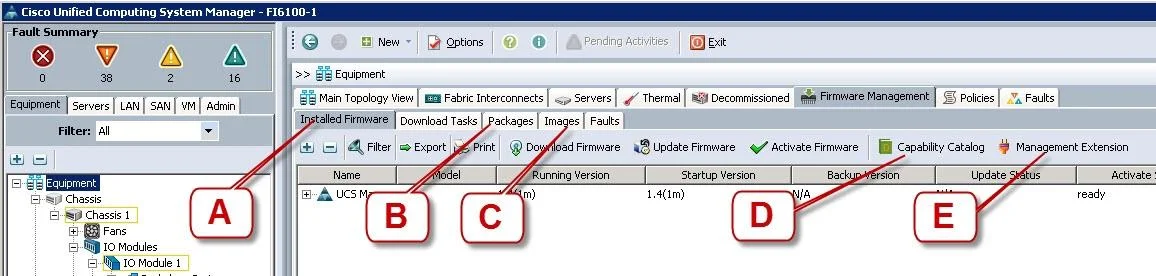
Options
- AA - Installed Firmware
- BB - Packages
- CC - Images
- DD - Capability Catalog
- EE - Management Extension
How the community answered
(44 responses)- A14% (6)
- B77% (34)
- C2% (1)
- D2% (1)
- E5% (2)
Why each option
In Cisco UCS Manager, the Packages section organizes firmware into bundles and lists the specific component versions - including B200 BIOS - included in each release.
Installed Firmware shows firmware versions currently active on discovered endpoints, not what is bundled within a specific UCS Manager release.
The Packages view in UCS Manager Firmware Management groups firmware into B-Series, C-Series, and Infrastructure bundles, and each package entry explicitly lists the component firmware versions it contains, such as the BIOS version for a B200 blade. This is the correct location to cross-reference a specific UCS Manager release version against the bundled BIOS version for a given server model.
Images lists individual uploaded firmware image files without the organized bundle-to-component version mapping needed to identify which BIOS ships with a release.
Capability Catalog describes supported hardware capabilities and feature compatibility, not specific firmware version details.
Management Extension handles third-party or optional software extensions, not server component firmware versions.
Concept tested: Finding server BIOS version in UCS Manager firmware packages
Source: https://www.cisco.com/c/en/us/td/docs/unified_computing/ucs/ucs-manager/GUI-User-Guides/Firmware-Mgmt/4-1/b_UCSM_GUI_Firmware_Management_Guide_4-1.html
Topics
Community Discussion
No community discussion yet for this question.