
010-151 · Question #22
Refer to the exhibit. Where is the best place to see bootflash free space?
The correct answer is C. C - Local Storage Information. The Local Storage Information section is the dedicated area in the Cisco UCS Manager or NX-OS device dashboard that reports bootflash capacity and free space.
Question
Refer to the exhibit. Where is the best place to see bootflash free space?
Exhibit
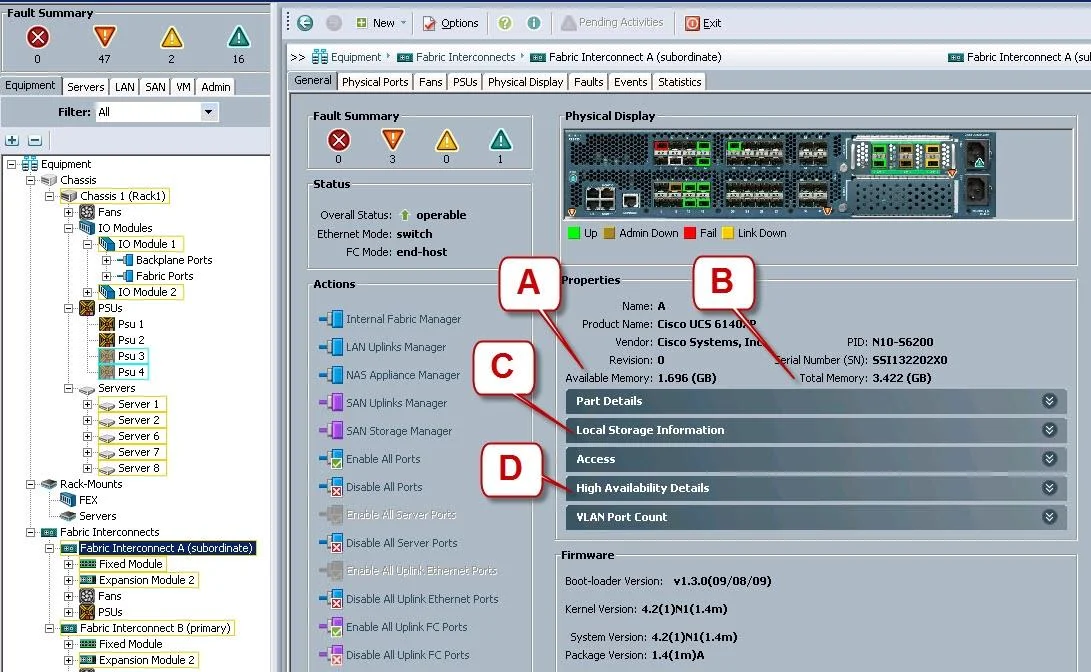
Options
- AA - Available Memory
- BB - Total Memory
- CC - Local Storage Information
- DD - High Availability Details
How the community answered
(63 responses)- A10% (6)
- B16% (10)
- C71% (45)
- D3% (2)
Why each option
The Local Storage Information section is the dedicated area in the Cisco UCS Manager or NX-OS device dashboard that reports bootflash capacity and free space.
Available Memory refers to system RAM, not flash storage capacity.
Total Memory reports the overall installed RAM in the device, not flash storage metrics.
The Local Storage Information panel is specifically designed to report filesystem metrics for local storage devices such as bootflash, displaying total capacity, used space, and available free space. This makes it the precise location to check bootflash utilization, as it directly surfaces storage-layer details rather than system memory or HA status.
High Availability Details shows HA state and redundancy status, not local storage utilization.
Concept tested: Locating bootflash free space in device management UI
Source: https://www.cisco.com/c/en/us/td/docs/unified_computing/ucs/ucs-manager/GUI-User-Guides/Getting-Started/3-1/b_UCSM_Getting_Started_Guide_3_1.html
Topics
Community Discussion
No community discussion yet for this question.