
010-151 · Question #17
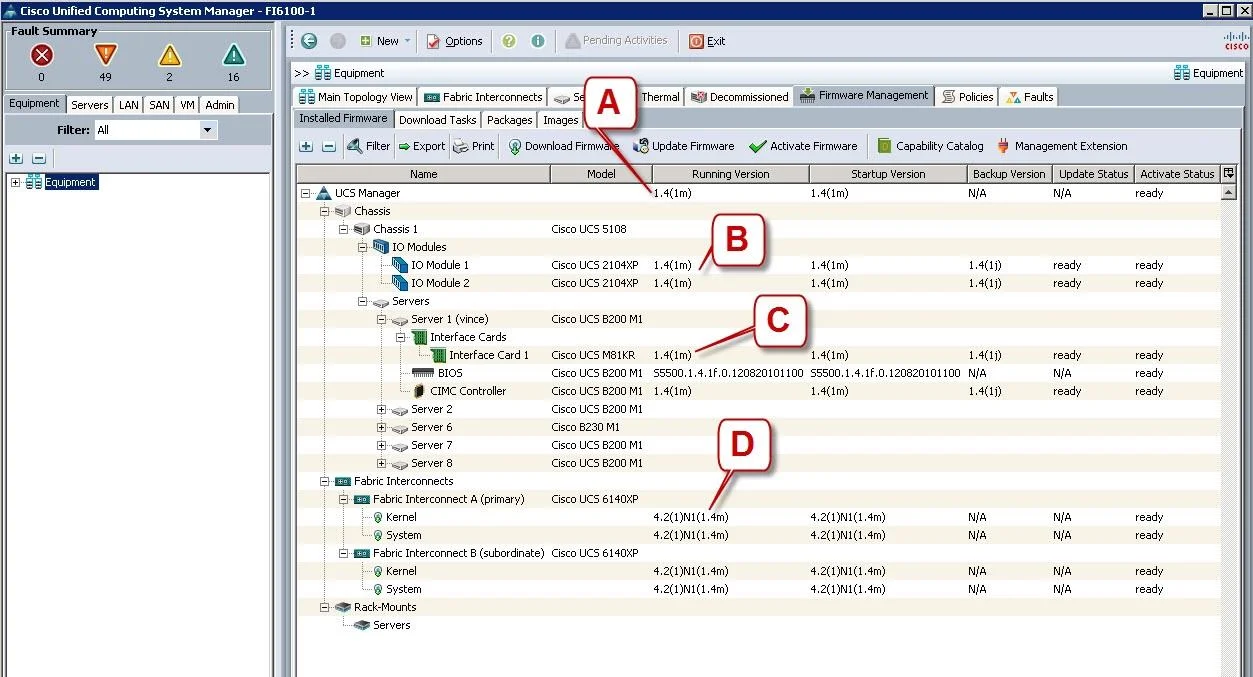
Refer to the exhibit. Which call-out accurately shows the current running version of the Cisco UCS Manager management software?
The correct answer is A. A - UCS Manager running version 1.4(1m). In the Cisco UCS Manager interface, the top-level software version displayed refers to the UCS Manager application itself, not individual hardware components.
Question
Refer to the exhibit. Which call-out accurately shows the current running version of the Cisco UCS Manager management software?
Exhibit
Options
- AA - UCS Manager running version 1.4(1m)
- BB - IO Module 1 running version 1.4(1m)
- CC - Interface Card 1 running version 1.4(1m)
- DD - Kernel running version 4.2(1)N(1.4m)
How the community answered
(52 responses)- A75% (39)
- B4% (2)
- C6% (3)
- D15% (8)
Why each option
In the Cisco UCS Manager interface, the top-level software version displayed refers to the UCS Manager application itself, not individual hardware components.
Call-out A points to the UCS Manager software version field, which reports the version of the management plane application - in this case 1.4(1m). This is the authoritative indicator of the UCS Manager software release currently running, distinct from firmware versions of individual hardware components.
Call-out B identifies the IO Module 1 firmware version, which reflects the I/O module's own firmware, not the UCS Manager management software version.
Call-out C identifies the Interface Card 1 firmware version, a separate hardware component firmware entry unrelated to the UCS Manager software version.
Call-out D shows the Kernel version, which is a lower-level OS component version, not the UCS Manager management application version.
Concept tested: Identifying UCS Manager software version in GUI
Source: https://www.cisco.com/c/en/us/td/docs/unified_computing/ucs/ucs-manager/GUI-User-Guides/Getting-Started/3-1/b_UCSM_GUI_Getting_Started_Guide_3_1.html
Topics
Community Discussion
No community discussion yet for this question.