
010-151 · Question #20
Refer to the exhibit. Where is the best place to see whether the system is ready for a Fabric Interconnect failover?
The correct answer is E. E - High Availability Details. The High Availability Details section in UCS Manager provides the definitive status of Fabric Interconnect failover readiness, including cluster state and failover eligibility.
Question
Refer to the exhibit. Where is the best place to see whether the system is ready for a Fabric Interconnect failover?
Exhibit
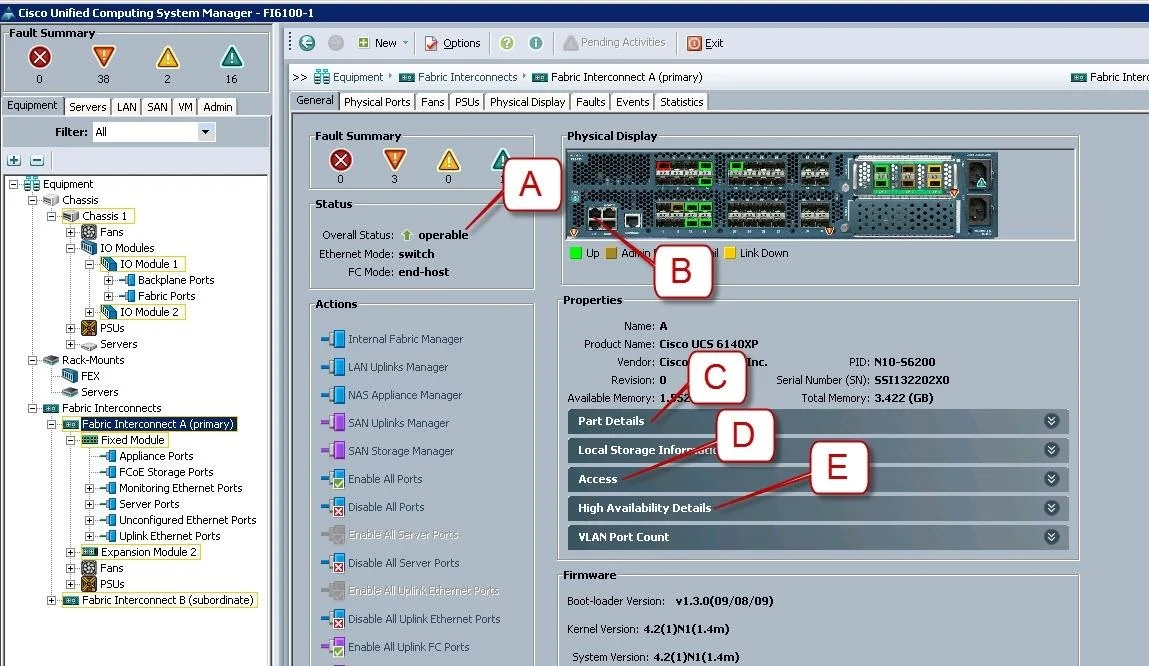
Options
- AA - Overall Status operable
- BB - L1 Connection
- CC - Part Details
- DD - Access
- EE - High Availability Details
How the community answered
(50 responses)- A2% (1)
- B4% (2)
- C10% (5)
- D2% (1)
- E82% (41)
Why each option
The High Availability Details section in UCS Manager provides the definitive status of Fabric Interconnect failover readiness, including cluster state and failover eligibility.
Overall Status showing 'operable' confirms the FI is functioning but does not provide specific HA cluster synchronization or failover readiness details.
L1 Connection indicates the physical cross-connect link status between Fabric Interconnects, but does not summarize overall failover readiness.
Part Details shows hardware inventory and part numbers, which are irrelevant to determining HA failover readiness.
Access displays management access configuration details and does not reflect HA cluster state or failover eligibility.
The High Availability Details pane in UCS Manager explicitly reports the cluster state, whether the system is in a ready or degraded HA posture, and the readiness of each Fabric Interconnect for failover. This is the authoritative location to confirm that both FIs are synchronized and that a failover can proceed without service disruption.
Concept tested: UCS Fabric Interconnect high availability failover readiness
Source: https://www.cisco.com/c/en/us/td/docs/unified_computing/ucs/ucs-manager/GUI-User-Guides/Getting-Started/3-1/b_UCSM_GUI_Getting_Started_Guide_3_1/b_UCSM_GUI_Getting_Started_Guide_3_1_chapter_010.html
Topics
Community Discussion
No community discussion yet for this question.