
010-151 · Question #26
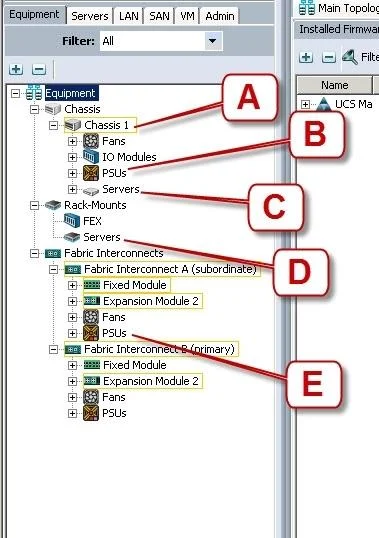
Refer to the exhibit. Where is the best place to see the power supply status of the blade server enclosure?
The correct answer is B. B - Chassis 1 - PSUs. In Cisco UCS Manager, the power supply status for a blade server enclosure is found under the Chassis PSUs node in the Equipment tab.
Question
Refer to the exhibit. Where is the best place to see the power supply status of the blade server enclosure?
Exhibit
Options
- AA - Chassis 1
- BB - Chassis 1 - PSUs
- CC - Chassis1 - Servers
- DD - Rack-Mounts - Servers
- EE - Fabric Interconnects A - PSUs
How the community answered
(32 responses)- A3% (1)
- B78% (25)
- C13% (4)
- E6% (2)
Why each option
In Cisco UCS Manager, the power supply status for a blade server enclosure is found under the Chassis PSUs node in the Equipment tab.
The top-level 'Chassis 1' node provides a general chassis summary but does not surface granular per-PSU status details.
The 'Chassis 1 - PSUs' node in Cisco UCS Manager's Equipment tab directly lists each power supply unit installed in the blade server chassis, showing operational state, faults, and input/output power values. This is the dedicated view for chassis-level PSU monitoring, isolated from server blades or fabric interconnect components.
'Chassis 1 - Servers' displays the blade servers installed in the chassis, not the power supply units.
'Rack-Mounts - Servers' is for monitoring rack-mounted servers and is unrelated to blade chassis PSUs.
'Fabric Interconnects A - PSUs' shows power supply status for the fabric interconnect hardware, not the blade server chassis.
Concept tested: Cisco UCS Manager chassis PSU monitoring location
Source: https://www.cisco.com/c/en/us/td/docs/unified_computing/ucs/ucs-manager/GUI-User-Guides/Getting-Started/3-2/b_UCSM_Getting_Started_Guide_3_2.html
Topics
Community Discussion
No community discussion yet for this question.