
010-151 · Question #125
Refer to the exhibit. What does it mean when item 7 (System Status LED) has a blinking red status?
The correct answer is D. Power on Self-Test (POST) failed. This question tests knowledge of server hardware LED indicators, specifically interpreting a blinking red System Status LED as a POST failure signal.
Question
Refer to the exhibit. What does it mean when item 7 (System Status LED) has a blinking red status?
Exhibit
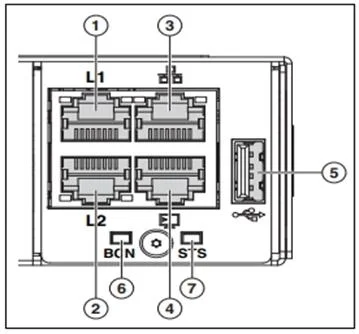
Options
- AMajor fault with the system board
- BPower shut down by software
- CSecure boot validation has failed
- DPower on Self-Test (POST) failed
- EMajor fault with memory DIMM
How the community answered
(66 responses)- A5% (3)
- B9% (6)
- C2% (1)
- D71% (47)
- E14% (9)
Why each option
This question tests knowledge of server hardware LED indicators, specifically interpreting a blinking red System Status LED as a POST failure signal.
A major fault with the system board is typically represented by a solid red or a dedicated fault LED pattern, distinct from the blinking red System Status LED.
A software-initiated power shutdown normally results in the system powering off entirely, not displaying a blinking red active status.
Secure boot validation failure is a firmware-level event that is generally reported through BIOS/UEFI logs or a separate indicator, not the general System Status LED blinking red.
A blinking red System Status LED indicates that Power on Self-Test (POST) failed, meaning the server encountered a critical hardware diagnostic error during its initial boot sequence before the OS loads. POST tests core components such as CPU, memory, and buses, and a failure at this stage is surfaced through the blinking red LED pattern to alert administrators of a non-bootable condition.
A memory DIMM fault is normally indicated by a dedicated DIMM slot fault LED located on the memory module or its socket, not the overall System Status LED.
Concept tested: Server System Status LED POST failure indication
Source: https://www.cisco.com/c/en/us/td/docs/unified_computing/ucs/c/hw/C240M6/install/C240M6.html
Topics
Community Discussion
4 Ingrid P.Dec 20, 2025
The System Status LED on Cisco UCS and similar platforms uses a blinking red state specifically to indicate a POST failure, not a persistent hardware fault. POST is the diagnostic sequence that runs at power-on, and a blink pattern rather than a solid red is the visual distinction here: solid red tends to map to a confirmed major fault, while the blink tells you the system tried to start but could not complete initialization. Answer D is correct. If you are building a card for this, front side should be the exact LED state plus the component name, back side is POST failure and a one-line note that blinking versus solid red carries different meanings. That distinction between blink and solid is a classic wrong-answer trap and worth drilling separately from the rest of the LED table.
 Genevieve F.Dec 9, 2025
POST blinking red on system status means POST failed, not a memory or board fault specifically.
 Ola B.Dec 8, 2025
Blinking red on the system status LED almost always points straight to the board itself.
Genevieve F.Dec 9, 2025Ola, the blinking red actually indicates a POST failure, which points to option D, a memory or CPU failure, not the board itself, since POST errors surface before the OS ever loads and are almost always tied to a seated component like RAM or the processor.