
010-151 · Question #124
Refer to the exhibit. Which item does D represent?
The correct answer is A. Pin icon (prevents Navigation pane from sliding). This question tests recognition of UI navigation controls in a software interface, specifically the pin icon used to lock the Navigation pane in a fixed position.
Question
Refer to the exhibit. Which item does D represent?
Exhibit
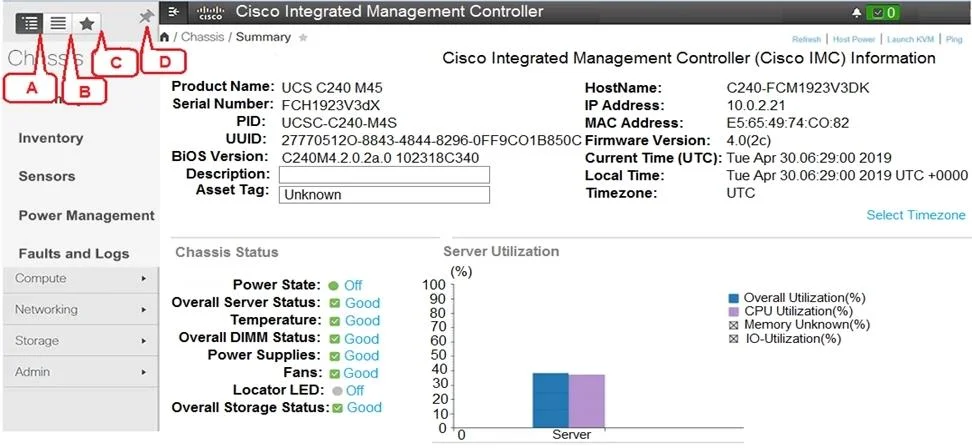
Options
- APin icon (prevents Navigation pane from sliding)
- BFavorite icon (make any specific work pane in the application as your favorite)
- CTo view the Navigation pane
- DIndex Icon (view listing in alphabetical order)
How the community answered
(24 responses)- A83% (20)
- B8% (2)
- C4% (1)
- D4% (1)
Why each option
This question tests recognition of UI navigation controls in a software interface, specifically the pin icon used to lock the Navigation pane in a fixed position.
The pin icon in application interfaces such as Cisco UCS Manager prevents the Navigation pane from auto-hiding or sliding away, keeping it persistently visible alongside the work area. This is a standard UI anchoring control that 'pins' a panel open so it does not collapse when focus shifts to another pane.
A Favorite icon is typically represented by a star or bookmark symbol and is used to save or mark items for quick access, not to control pane visibility or position.
An icon to view the Navigation pane would toggle or reveal the pane, not lock it in a stationary open position.
An Index icon for alphabetical listing would sort or reorganize displayed content, not interact with the Navigation pane's slide behavior.
Concept tested: Application UI navigation pane pin control
Topics
Community Discussion
No community discussion yet for this question.