
VCP550 · Question #74
A vSphere administrator created a Virtual SAN and a relevant virtual machine Storage Policy. The administrator is unable to select this virtual machine Storage Policy when creating a new virtual…
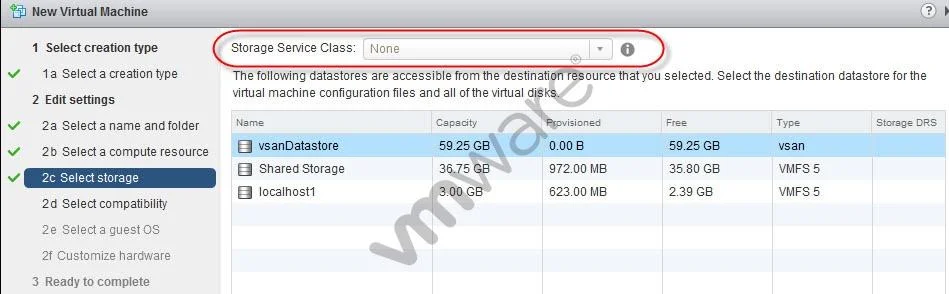
The correct answer is A. The administrator did not enable the virtual machine Storage Policy per compute resource. VM Storage Policies must be explicitly enabled on the specific compute resource (host or cluster) before they can be selected during virtual machine creation.
Question
A vSphere administrator created a Virtual SAN and a relevant virtual machine Storage Policy. The administrator is unable to select this virtual machine Storage Policy when creating a new virtual machine. Based on the exhibit, why is the administrator unable to select this virtual machine Storage Policy?
Exhibit
Options
- AThe administrator did not enable the virtual machine Storage Policy per compute resource.
- BThe ESXi Host license does not support virtual machine Storage Policies.
- CThe vCenter Server license does not support virtual machine Storage Policies.
- DThe administrator did not create a storage policy for the datastore selected for the virtual machine.
How the community answered
(31 responses)- A61% (19)
- B13% (4)
- C23% (7)
- D3% (1)
Why each option
VM Storage Policies must be explicitly enabled on the specific compute resource (host or cluster) before they can be selected during virtual machine creation.
In vSphere, VM Storage Policies are managed through the Storage Policy framework, which requires the administrator to enable and associate the policy with the target compute resource - such as a host or cluster. Without this enablement step, the policy will not appear as a selectable option in the VM provisioning wizard even if the policy itself was created successfully.
ESXi host licensing does not govern the availability of VM Storage Policies; this feature is managed at the vCenter Server level and is not restricted by individual ESXi host license tiers.
Standard vCenter Server licenses support VM Storage Policies; a licensing limitation would typically prevent creation of the policy entirely rather than silently hiding it from the provisioning UI.
VM Storage Policies are defined independently of specific datastores and are mapped at the compute resource level; a missing per-datastore policy is not the reason a storage policy is unavailable during VM creation.
Concept tested: VM Storage Policy enablement per compute resource
Source: https://docs.vmware.com/en/VMware-vSphere/7.0/com.vmware.vsphere.storage.doc/GUID-89091D59-D844-46B2-94C2-35A3961D23E7.html
Topics
Community Discussion
No community discussion yet for this question.