
VCP550 · Question #34
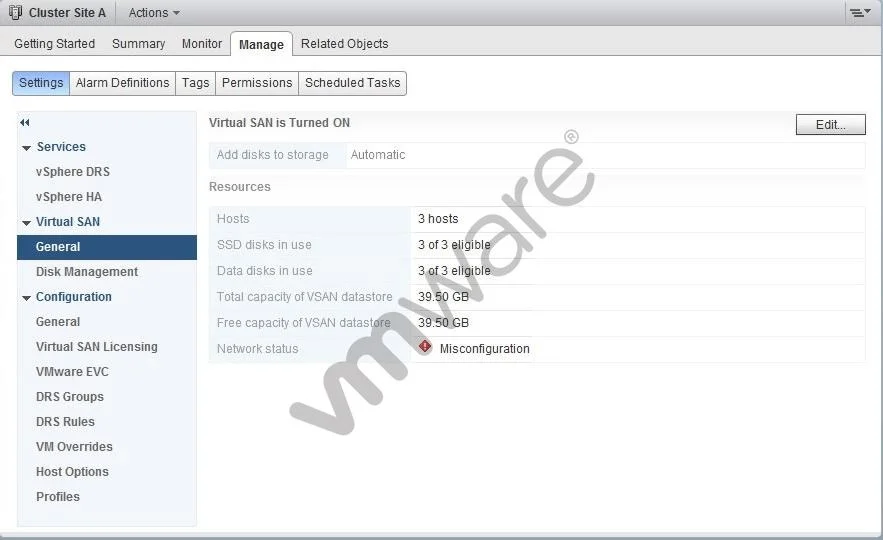
A vSphere administrator observes a problem with the Virtual SAN Cluster Setting as shown: Which action should the administrator take on the vmkernel portgroup on all hosts used by Virtual SAN…
The correct answer is A. Select the Virtual SAN traffic option. A VMkernel portgroup used for Virtual SAN must have the Virtual SAN traffic type explicitly enabled, or the cluster will report a configuration problem.
Question
A vSphere administrator observes a problem with the Virtual SAN Cluster Setting as shown:
Which action should the administrator take on the vmkernel portgroup on all hosts used by Virtual SAN cluster to resolve this problem?
Exhibit
Options
- ASelect the Virtual SAN traffic option
- BIncrease the MTU value
- CChange the DNS server address
- DIncrease the Port Speed
How the community answered
(27 responses)- A81% (22)
- B4% (1)
- C4% (1)
- D11% (3)
Why each option
A VMkernel portgroup used for Virtual SAN must have the Virtual SAN traffic type explicitly enabled, or the cluster will report a configuration problem.
VMware vSAN requires a dedicated VMkernel adapter with the 'Virtual SAN' traffic type selected on each host in the cluster. Without this tag, the host cannot participate in vSAN inter-host communication for object storage, causing the cluster to flag a configuration error.
Increasing MTU improves network efficiency for large transfers but does not resolve a missing vSAN traffic-type assignment on the VMkernel port.
DNS server configuration is unrelated to vSAN VMkernel traffic tagging and does not affect vSAN cluster connectivity.
Port speed is a physical NIC property and cannot be changed on a VMkernel portgroup; it also has no bearing on the vSAN traffic type configuration.
Concept tested: VMkernel port vSAN traffic type enablement
Source: https://docs.vmware.com/en/VMware-vSphere/7.0/com.vmware.vsphere.vsan.doc/GUID-1A5C7F46-8B85-4F89-A6B0-5A0F0A5B3B7B.html
Topics
Community Discussion
No community discussion yet for this question.