
VCP550 · Question #11
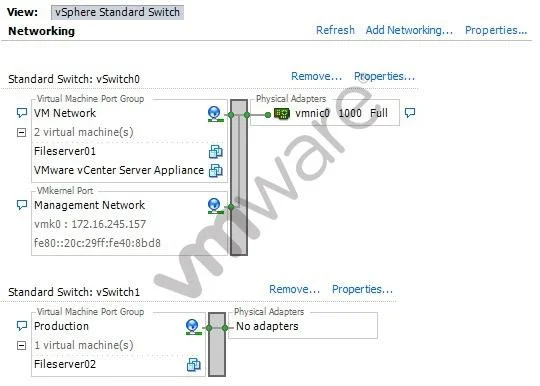
The vSphere administrator needs to remove the Production virtual machine port group from an ESXi host. The ESXi host's Networking Configuration tab is shown in the exhibit. After disconnecting the…
The correct answer is B. Remove the Production port group by accessing the properties for vSwitch1. In vSphere standard networking, port groups are child objects of a virtual switch and must be removed through the parent vSwitch's properties dialog.
Question
The vSphere administrator needs to remove the Production virtual machine port group from an ESXi host. The ESXi host's Networking Configuration tab is shown in the exhibit. After disconnecting the Fileserver02 VM, what step does the administrator need to take, assuming that vSwitch1 will still be needed for further configuration?
Exhibit
Options
- ARemove the Production port group by accessing the properties for the port group.
- BRemove the Production port group by accessing the properties for vSwitch1.
- CRemove the Production port group by accessing the properties for the Network.
- DRemove the Production port group by removing vSwitch1.
How the community answered
(52 responses)- A8% (4)
- B71% (37)
- C4% (2)
- D17% (9)
Why each option
In vSphere standard networking, port groups are child objects of a virtual switch and must be removed through the parent vSwitch's properties dialog.
Accessing the port group's own properties in the vSphere networking UI does not expose an option to delete the port group - removal requires navigating through the parent vSwitch.
Virtual machine port groups in a vSphere standard switch are managed as components of the vSwitch itself. To remove a port group without deleting the entire switch, the administrator opens the properties of vSwitch1 and removes the Production port group from within that dialog. This preserves vSwitch1 and any remaining port groups or uplinks configured on it.
Accessing properties of the physical Network adapter (vmnic) controls uplink assignment, not port group management.
Removing vSwitch1 would destroy the switch along with all associated port groups and uplinks, which contradicts the requirement to keep vSwitch1 for further configuration.
Concept tested: Removing a VM port group via vSwitch properties
Source: https://docs.vmware.com/en/VMware-vSphere/7.0/com.vmware.vsphere.networking.doc/GUID-D5960C77-0D19-4669-A00C-B05D58A422F8.html
Topics
Community Discussion
No community discussion yet for this question.