
VCP550 · Question #9
An administrator determines that traffic shaping does not appear to be working on Production, a virtual machine port group on vSwitch1. Traffic shaping is working on all other port groups on the…
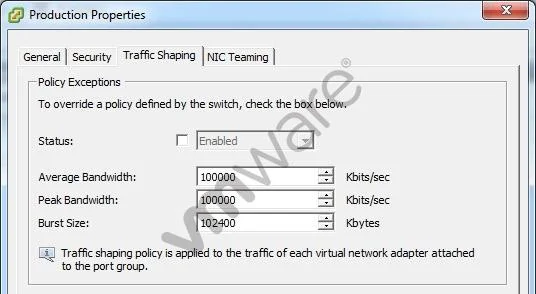
The correct answer is A. Select the Status checkbox to enable Traffic Shaping on the portgroup. Traffic shaping is configured on the Production port group but the Status option is not enabled, so the settings have no effect.
Question
An administrator determines that traffic shaping does not appear to be working on Production, a virtual machine port group on vSwitch1. Traffic shaping is working on all other port groups on the switch. The administrator examines the Traffic Shaping settings as shown in the exhibit:
What should the administrator do to resolve the problem?
Exhibit
Options
- ASelect the Status checkbox to enable Traffic Shaping on the portgroup.
- BReduce the Average Bandwidth to 50% of the Peak Bandwidth.
- CReduce the Burst Size to 50% of the Peak Bandwidth.
- DClick the Security tab and create the necessary security exception.
How the community answered
(37 responses)- A84% (31)
- B8% (3)
- C5% (2)
- D3% (1)
Why each option
Traffic shaping is configured on the Production port group but the Status option is not enabled, so the settings have no effect.
In vSphere, traffic shaping settings such as Average Bandwidth, Peak Bandwidth, and Burst Size are defined independently of whether the feature is active. The Status checkbox must be explicitly enabled for the configured values to take effect on the port group. Because all other port groups on vSwitch1 are working, the misconfiguration is isolated to this disabled Status setting on the Production port group.
Adjusting Average Bandwidth relative to Peak Bandwidth is a tuning consideration, not a fix for traffic shaping being entirely inactive due to a disabled Status.
Reducing Burst Size is a bandwidth policy tuning step and does not address the root cause of traffic shaping being switched off.
Security exceptions on the Security tab govern MAC address changes, forged transmits, and promiscuous mode - they have no relationship to traffic shaping functionality.
Concept tested: Enabling vSphere traffic shaping on a port group
Source: https://docs.vmware.com/en/VMware-vSphere/7.0/com.vmware.vsphere.networking.doc/GUID-5A1D0C49-6BE0-4ABF-BF96-7E83C3ECE08F.html
Topics
Community Discussion
No community discussion yet for this question.