
SC-401 · Question #59
Drag and Drop Question You have a Microsoft 365 E5 subscription that has data loss prevention (DLP) implemented. You need to create a custom sensitive info type. The solution must meet the following…
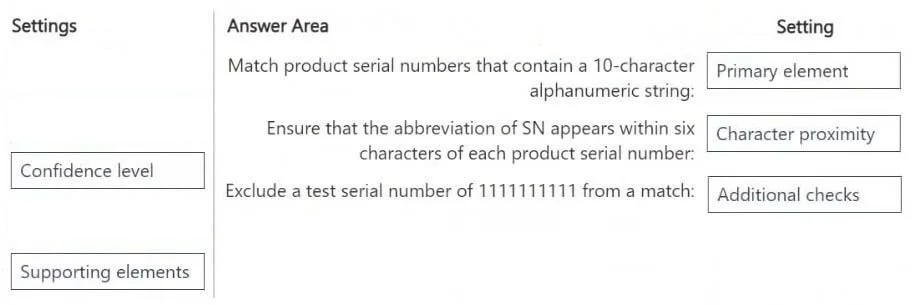
The correct answer is Primary element; Character proximity; Additional checks. The question requires matching specific criteria for creating a custom sensitive information type in Microsoft 365 DLP to the corresponding configuration settings.
Question
Exhibits
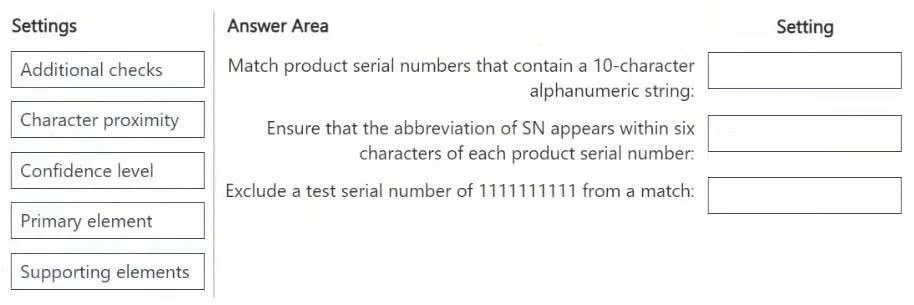
Answer Area
Drag items
Correct arrangement
- Primary element
- Character proximity
- Additional checks
Explanation
The question requires matching specific criteria for creating a custom sensitive information type in Microsoft 365 DLP to the corresponding configuration settings.
Approach. 1. For the requirement 'Match product serial numbers that contain a 10-character alphanumeric string', the 'Primary element' setting should be dragged. The primary element defines the main regular expression or keyword list that identifies the sensitive information itself. A 10-character alphanumeric string is the core pattern for the serial number. 2. For the requirement 'Ensure that the abbreviation of SN appears within six characters of each product serial number', the 'Character proximity' setting should be dragged. This setting is used to specify that a supporting element (like 'SN') must appear within a certain character range of the primary element to confirm a match. 3. For the requirement 'Exclude a test serial number of 1111111111 from a match', the 'Additional checks' setting should be dragged. This setting allows for defining negative keywords or regular expressions that, if found, will prevent the item from being identified as sensitive, even if it matches the primary element.
Common mistakes.
- common_mistake. Using 'Confidence level' or 'Supporting elements' incorrectly. 'Confidence level' defines how certain the system is that a match is sensitive, not the pattern itself or exclusions. While 'Supporting elements' are related to 'Character proximity' as the content that needs to be in proximity, the requirement specifically asks to 'ensure SN appears within six characters', which directly refers to the 'Character proximity' setting that defines the distance rule, not just the element itself. Using 'Supporting elements' for the exclusion would also be incorrect as supporting elements increase the likelihood of a match, they do not exclude. Placing 'Confidence level' for any of the pattern definition or exclusion requirements would be incorrect because it pertains to the accuracy threshold for triggering a DLP policy, not the pattern matching logic.
Concept tested. Microsoft 365 Data Loss Prevention (DLP) - Custom sensitive information types configuration, specifically understanding the purpose and application of primary elements, character proximity, additional checks (negative conditions), confidence levels, and supporting elements.
Reference. null
Topics
Community Discussion
No community discussion yet for this question.