
SC-401 · Question #48
Drag and Drop Question You have a Microsoft 365 E5 subscription that uses Microsoft Defender for Cloud Apps. You plan to deploy a Defender for Cloud Apps file policy that will be triggered when the…
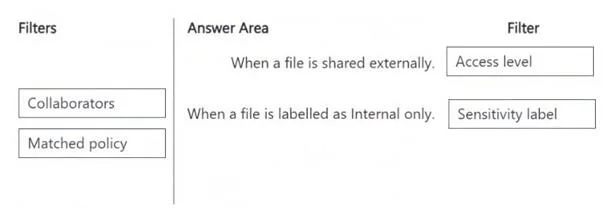
The correct answer is Access level; Sensitivity label. To detect external sharing, use the 'Access level' filter, and to identify files classified as 'Internal only', use the 'Sensitivity label' filter in Microsoft Defender for Cloud Apps file policies.
Question
Exhibits
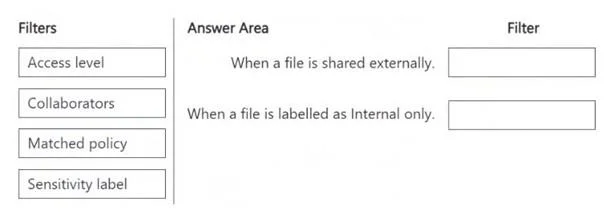
Answer Area
Drag items
Correct arrangement
- Access level
- Sensitivity label
Explanation
To detect external sharing, use the 'Access level' filter, and to identify files classified as 'Internal only', use the 'Sensitivity label' filter in Microsoft Defender for Cloud Apps file policies.
Approach. For the condition 'When a file is shared externally.', the correct filter to drag is 'Access level'. This is because the 'Access level' filter in Defender for Cloud Apps allows you to specify the sharing permission or level of access a file has, such as 'Public', 'External', 'Internal', 'Private', etc. If a file is shared externally, its access level would reflect this external sharing status. For the condition 'When a file is labelled as Internal only.', the correct filter to drag is 'Sensitivity label'. Microsoft 365 sensitivity labels are used to classify data and apply protection settings like encryption or watermarks. A label like 'Internal only' is a prime example of a sensitivity label. Defender for Cloud Apps can detect and act upon these labels to enforce data governance policies.
Common mistakes.
- common_mistake. Using 'Collaborators' for external sharing is incorrect because 'Collaborators' typically refers to specific users or groups who have access, whereas 'Access level' describes the broader sharing scope (e.g., publicly accessible, externally shared link). While external users can be collaborators, 'Access level' is the more direct and general filter for external sharing status. Using 'Matched policy' for either condition is incorrect because it relates to whether another policy has already been triggered on the file, not the file's sharing status or classification itself. Applying 'Sensitivity label' to external sharing or 'Access level' to internal-only labels would also be incorrect as they address different aspects of a file's security posture.
Concept tested. Microsoft Defender for Cloud Apps (MDCA) file policy creation, specifically understanding and applying appropriate filters for detecting file sharing and sensitivity label classifications. This tests knowledge of MDCA's capabilities in data governance, security, and integration with Microsoft 365 sensitivity labels.
Reference. null
Topics
Community Discussion
No community discussion yet for this question.