
SC-401 · Question #141
Drag and Drop Question You have a Microsoft 365 tenant. A new regulatory requirement states that all documents containing a patent ID be labeled, retained for 10 years, and then deleted. The policy…
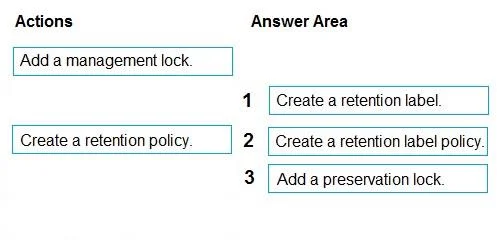
The correct answer is Create a retention label.; Create a retention policy.; Add a preservation lock. To meet regulatory requirements for labeling, retaining, and protecting documents in Microsoft 365, you must first create a retention label, then publish it via a retention label policy, and finally apply a preservation lock to the policy to prevent its modification or deletion.
Question
Exhibits
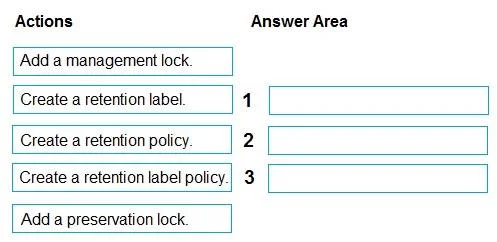
Answer Area
Drag items
Correct arrangement
- Create a retention label.
- Create a retention policy.
- Add a preservation lock.
Explanation
To meet regulatory requirements for labeling, retaining, and protecting documents in Microsoft 365, you must first create a retention label, then publish it via a retention label policy, and finally apply a preservation lock to the policy to prevent its modification or deletion.
Approach. The scenario requires labeling documents containing a patent ID, retaining them for 10 years, deleting them afterward, and critically, ensuring the policy cannot be disabled or deleted. This necessitates a specific sequence of actions in Microsoft 365 Compliance:
-
Create a retention label: The first step is to define the retention settings. A 'retention label' allows for granular application to specific items (documents with patent IDs in this case) and defines the 'retain for 10 years, then delete' action. This is distinct from a general retention policy, as labels offer more flexibility for content-based application.
-
Create a retention label policy: Once the retention label is defined, a 'retention label policy' is needed to publish this label to the appropriate locations (e.g., SharePoint, OneDrive) and make it available for users to apply or for auto-labeling based on criteria like sensitive information types or keywords (e.g., patent ID). Without a policy, the label cannot be effectively deployed.
-
Add a preservation lock: The most critical part of the requirement states that 'The policy used to apply the retention settings must never be disabled or deleted by anyone.' A 'preservation lock' (also known as a Retention Policy Lock or Immutable Policy) is the specific Microsoft 365 compliance feature designed to make a retention policy or retention label policy immutable. Once applied, even administrators cannot disable, delete, or make the policy less restrictive, directly fulfilling this regulatory constraint.
Common mistakes.
-
common_mistake. Common mistakes include choosing 'Create a retention policy' instead of 'Create a retention label policy' and 'Add a management lock' instead of 'Add a preservation lock'.
-
'Create a retention policy': While a general retention policy can retain and delete, the scenario specifies 'documents containing a patent ID be labeled'. Retention labels are designed for more granular, item-level retention and are often applied based on content or user action, which aligns better with the 'patent ID' requirement. A standard retention policy typically applies to an entire location (e.g., all SharePoint sites) rather than specific document types within them through labeling.
-
'Add a management lock': A 'management lock' is an Azure resource lock feature used to prevent accidental deletion or modification of Azure resources (like VMs, storage accounts). It is an Azure-specific concept and does not apply to Microsoft 365 compliance policies. The correct Microsoft 365 compliance feature for making a retention policy immutable is a 'preservation lock' (or Retention Policy Lock).
-
Incorrect order: It's crucial to define the label (what to do) before you create a policy to publish it (how to apply it). The preservation lock must be the final step, applied after the policy has been created and published, to protect the existing policy from modification.
Concept tested. Microsoft 365 Compliance, Retention Labels, Retention Label Policies, and Preservation Locks (Retention Policy Locks) for data governance and regulatory compliance, specifically understanding the lifecycle of applying and protecting retention settings.
Topics
Community Discussion
No community discussion yet for this question.