
SC-401 · Question #18
You have a Microsoft 365 E5 subscription that contains a retention policy named RP1 as shown in the following table. You place a preservation lock on RP1. You need to modify RP1. Which two…
The correct answer is A. Add locations to the policy. F. Increase the retention period of the policy. A Preservation Lock in Microsoft Purview Retention Policies enforces strict compliance and prevents certain modifications to ensure data is retained according to compliance requirements. When a Preservation Lock is applied: 1. You cannot disable or delete the policy. 2. You…
Question
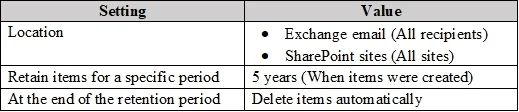
You have a Microsoft 365 E5 subscription that contains a retention policy named RP1 as shown in the following table. You place a preservation lock on RP1. You need to modify RP1. Which two modifications can you perform? Each correct answer presents part of the solution. NOTE: Each correct selection is worth one point.
Exhibit
Options
- AAdd locations to the policy.
- BDelete the policy.
- CRemove locations from the policy.
- DDecrease the retention period of the policy.
- EDisable the policy.
- FIncrease the retention period of the policy.
How the community answered
(35 responses)- A80% (28)
- C6% (2)
- D3% (1)
- E11% (4)
Explanation
A Preservation Lock in Microsoft Purview Retention Policies enforces strict compliance and prevents certain modifications to ensure data is retained according to compliance requirements. When a Preservation Lock is applied: 1. You cannot disable or delete the policy. 2. You cannot remove locations from the policy. 3. You cannot decrease the retention period. 4. You can add locations to the policy. 5. You can increase the retention period. You can expand the retention policy to cover additional locations (e.g., more Exchange mailboxes, SharePoint sites). You can extend the retention duration (e.g., increase from 5 years to 10 years) since this aligns with stricter compliance.
Topics
Community Discussion
No community discussion yet for this question.