
SC-401 · Question #17
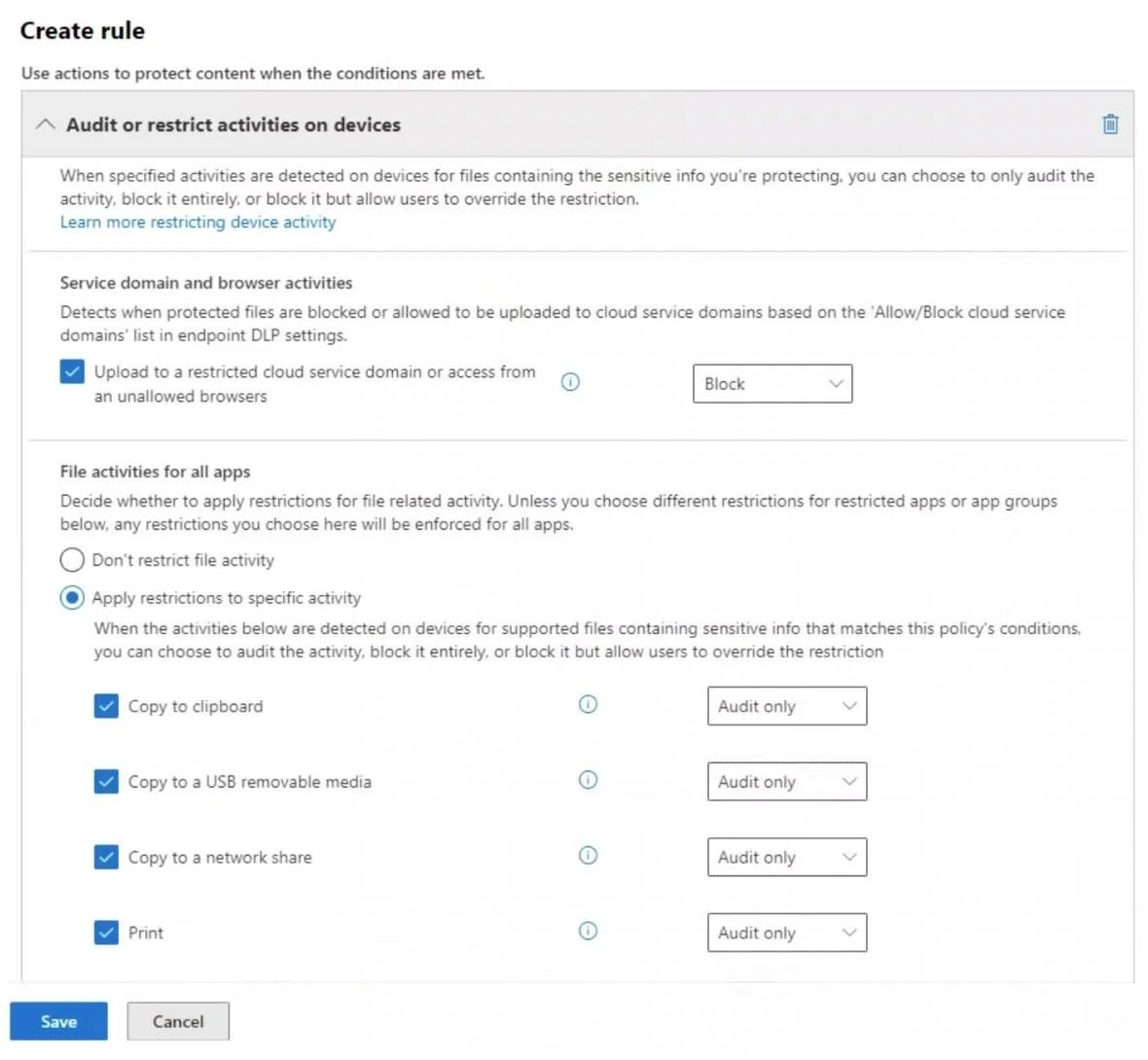
You have a data loss prevention (DLP) policy configured for endpoints as shown in the following exhibit. From a computer named Computer1, a user can sometimes upload files to cloud services and…
The correct answer is A. The unallowed browsers in the Microsoft 365 Endpoint data loss prevention (Endpoint DLP) B. There are file path exclusions in the Microsoft 365 Endpoint data loss prevention (Endpoint DLP). The inconsistent behavior (sometimes blocked, sometimes not) is explained by two Endpoint DLP configuration factors. First, unallowed browsers (A): Endpoint DLP enforces restrictions on specific browsers; if a user uploads using an unallowed browser the action is blocked, but…
Question
You have a data loss prevention (DLP) policy configured for endpoints as shown in the following exhibit. From a computer named Computer1, a user can sometimes upload files to cloud services and sometimes cannot. Other users experience the same issue. What are two possible causes of the issue? Each correct answer presents a complete solution. NOTE: Each correct selection is worth one point.
Exhibit
Options
- AThe unallowed browsers in the Microsoft 365 Endpoint data loss prevention (Endpoint DLP)
- BThere are file path exclusions in the Microsoft 365 Endpoint data loss prevention (Endpoint DLP)
- CThe Access by restricted apps action is set to Audit only.
- DThe Copy to clipboard action is set to Audit only.
- EThe computers are NOT onboarded to Microsoft Purview.
How the community answered
(32 responses)- A72% (23)
- C9% (3)
- D6% (2)
- E13% (4)
Explanation
The inconsistent behavior (sometimes blocked, sometimes not) is explained by two Endpoint DLP configuration factors. First, unallowed browsers (A): Endpoint DLP enforces restrictions on specific browsers; if a user uploads using an unallowed browser the action is blocked, but using an allowed browser may permit the upload - causing the inconsistency. Second, file path exclusions (B): if a file resides in a path excluded from Endpoint DLP monitoring, the policy does not apply to it, so uploads succeed; files outside exclusions are caught and blocked. Option C (Audit only for restricted apps) would allow all uploads, never blocking - this would not cause intermittent behavior. Option D (Audit only for clipboard) is unrelated to cloud upload blocking. Option E (computers not onboarded) would cause the policy to never apply, not sometimes apply.
Topics
Community Discussion
No community discussion yet for this question.