
SC-401 · Question #122
SIMULATION Username and password Use the following login credentials as needed: To enter your username, place your cursor in the Sign in box and select the username below. To enter your password…
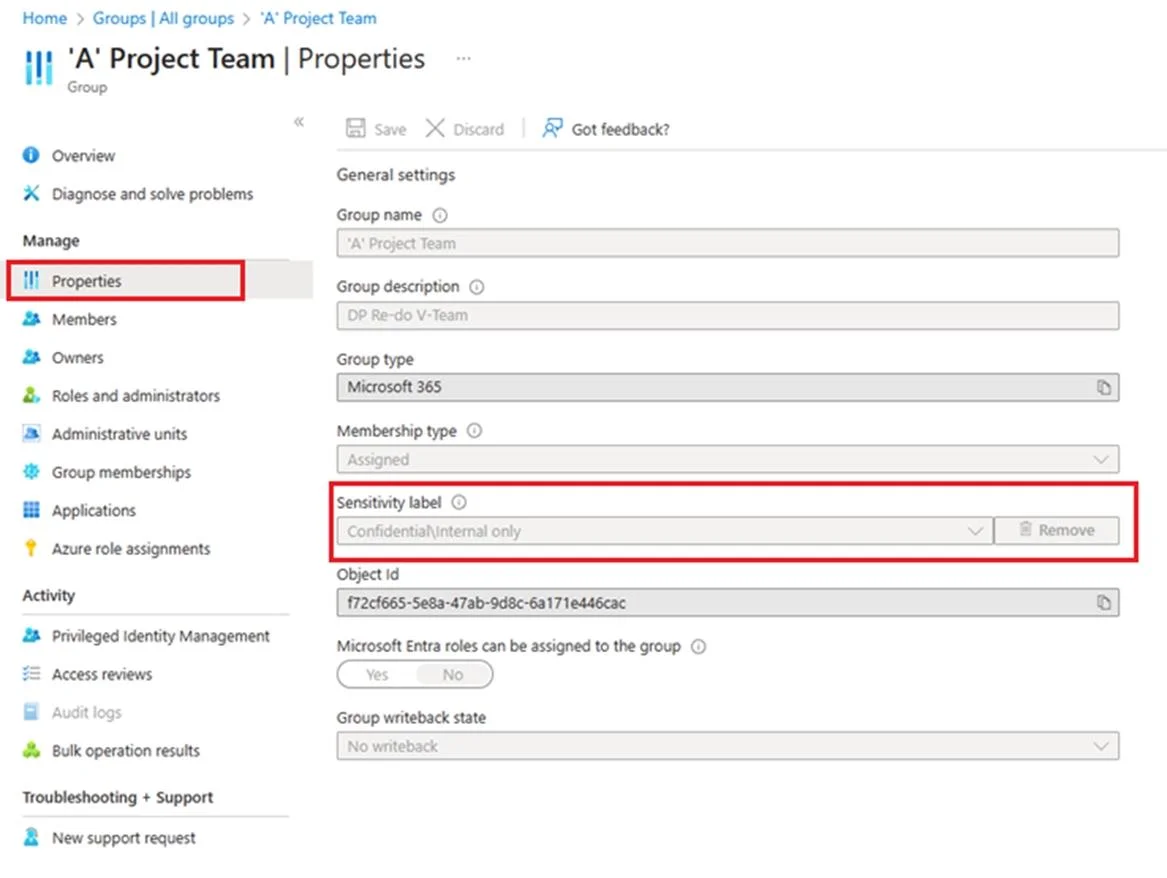
The correct answer is A. Assign sensitivity labels to Microsoft 365 groups in Microsoft Entra ID. Microsoft Entra ID supports applying sensitivity labels published by the Microsoft Purview compliance portal to Microsoft 365 Groups. Sensitivity labels apply to groups across services like Outlook, Microsoft Teams, and SharePoint. Assign a label to an existing group in the Microsoft Entra admin center. Step 1: Sign in to the Microsoft Entra admin center as at least a Global Administrator. Step 2: Select Microsoft Entra ID. Step 3: Select Groups. Step 4: From the All groups page, select the group that you want to label. Step 5: On the selected group’s page, select Properties and select a sensitivity label from the list. Select the Confidential - Finance label. To make a sensitivity label available for Microsoft 365 Groups and their associated containers (like Teams and SharePoint sites), you must assign the label to the specific group in Microsoft Entra ID.
Question
SIMULATION Username and password Use the following login credentials as needed:
To enter your username, place your cursor in the Sign in box and select the username below. To enter your password, place your cursor in the Enter password box and select the password below. Microsoft 365 Username:
[email protected] Microsoft 365 Password: XXXXXXXXX If the Microsoft Edge browser or Microsoft 365 portal does not load successfully, select the Microsoft Edge browser icon from the task bar, type the URL “https://admin microsoft.com”, and press Enter. The following information is for technical support purposes only:
Lab Instance: XXXXXXXX. Task 2 You discover that all users can apply the Confidential – Finance label. You need to ensure that the Confidential – Finance label is available only to the members of the Leadership group. Answer:
Assign sensitivity labels to Microsoft 365 groups in Microsoft Entra ID Microsoft Entra ID supports applying sensitivity labels published by the Microsoft Purview compliance portal to Microsoft 365 groups. Sensitivity labels apply to groups across services like Outlook, Microsoft Teams, and SharePoint. Assign a label to an existing group in the Microsoft Entra admin center Step 1: Sign in to the Microsoft Entra admin center as at least a Global Administrator. Step 2: Select Microsoft Entra ID. Step 3: Select Groups Step 4: From the All groups page, select the group that you want to label. Step 5: On the selected group's page, select Properties and select a sensitivity label from the list. Select the Confidential - Finance label Step 6: Select Save to save your changes. Reference:
https://learn.microsoft.com/en-us/entra/identity/users/groups-assign-sensitivity-labels
Exhibit
Options
- AAssign sensitivity labels to Microsoft 365 groups in Microsoft Entra ID. Microsoft Entra ID supports applying sensitivity labels published by the Microsoft Purview compliance portal to Microsoft 365 Groups. Sensitivity labels apply to groups across services like Outlook, Microsoft Teams, and SharePoint. Assign a label to an existing group in the Microsoft Entra admin center. Step 1: Sign in to the Microsoft Entra admin center as at least a Global Administrator. Step 2: Select Microsoft Entra ID. Step 3: Select Groups. Step 4: From the All groups page, select the group that you want to label. Step 5: On the selected group’s page, select Properties and select a sensitivity label from the list. Select the Confidential - Finance label
How the community answered
(22 responses)- A100% (22)
Why each option
To make a sensitivity label available for Microsoft 365 Groups and their associated containers (like Teams and SharePoint sites), you must assign the label to the specific group in Microsoft Entra ID.
This choice correctly outlines the process to assign a sensitivity label, like 'Confidential - Finance', to Microsoft 365 Groups within the Microsoft Entra admin center. Assigning a label to a group extends its availability and policies to the group's container and associated resources (Teams, SharePoint sites), which is how labels are made 'available' for group management.
Concept tested: Applying sensitivity labels to Microsoft 365 Groups
Source: https://learn.microsoft.com/en-us/microsoft-365/compliance/sensitivity-labels-teams-groups-sites?view=o365-worldwide#assign-a-sensitivity-label-to-a-new-group-or-an-existing-group
Topics
Community Discussion
No community discussion yet for this question.