
SC-401 · Question #107
You have a Microsoft OneDrive folder that contains the files shown in the following table. In Microsoft Defender for Cloud Apps, you create a file policy to automatically apply a classification…
The correct answer is B. The policy will apply to only the .docx files. The policy will classify only 100 files daily. Microsoft Defender for Cloud Apps file policies that apply sensitivity/classification labels have two important limitations: (1) File type support - automatic label application via Defender for Cloud Apps is only supported for Microsoft Office file formats such as .docx, .xlsx…
Question
You have a Microsoft OneDrive folder that contains the files shown in the following table. In Microsoft Defender for Cloud Apps, you create a file policy to automatically apply a classification. What is the effect of applying the policy?
Exhibit
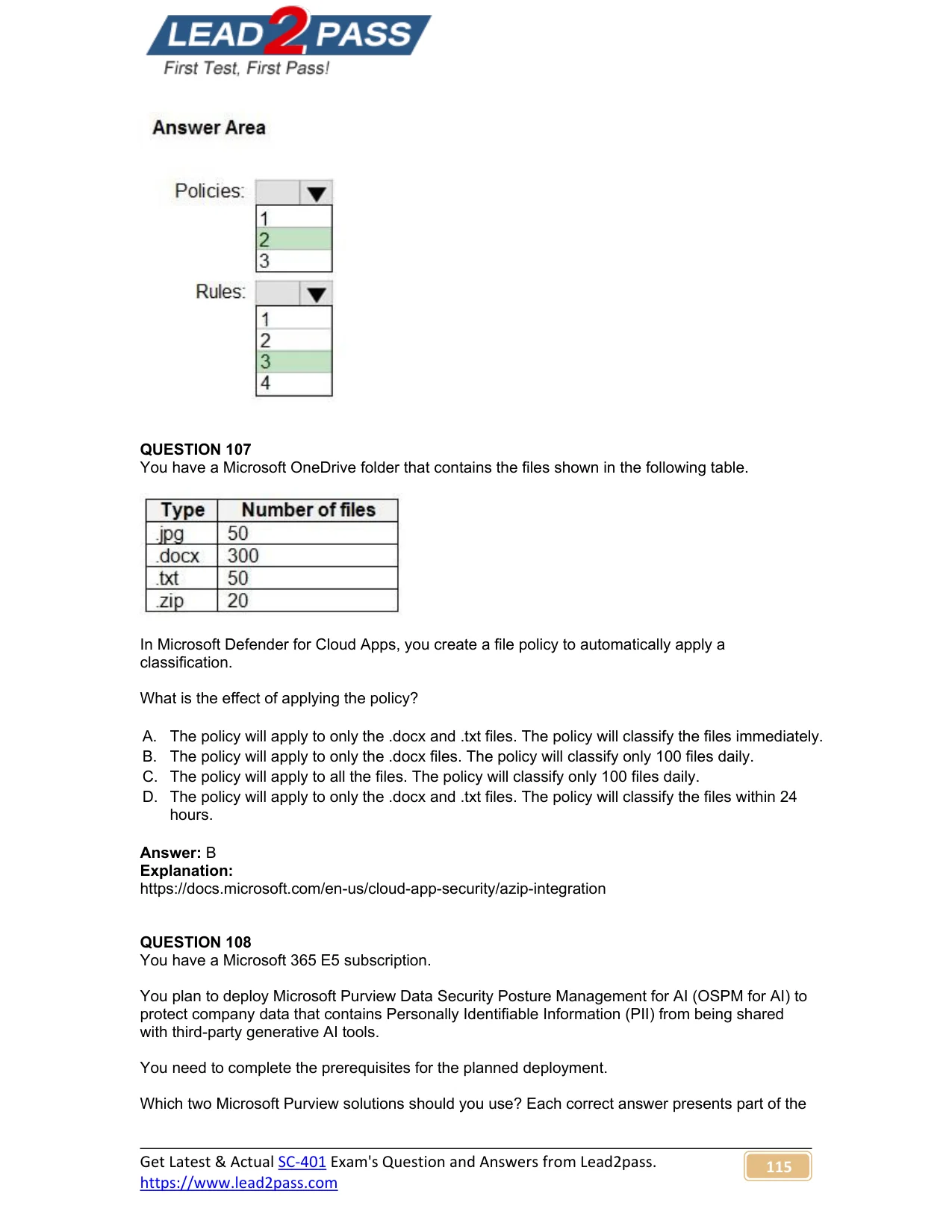
Options
- AThe policy will apply to only the .docx and .txt files. The policy will classify the files immediately.
- BThe policy will apply to only the .docx files. The policy will classify only 100 files daily.
- CThe policy will apply to all the files. The policy will classify only 100 files daily.
- DThe policy will apply to only the .docx and .txt files. The policy will classify the files within 24
How the community answered
(20 responses)- A5% (1)
- B80% (16)
- C10% (2)
- D5% (1)
Explanation
Microsoft Defender for Cloud Apps file policies that apply sensitivity/classification labels have two important limitations: (1) File type support - automatic label application via Defender for Cloud Apps is only supported for Microsoft Office file formats such as .docx, .xlsx, and .pptx. Plain text files (.txt) and other non-Office formats are not supported for automatic classification through this mechanism. (2) Daily processing limit - Defender for Cloud Apps can automatically classify a maximum of 100 files per day per policy. Combining these two constraints: the policy applies only to .docx files (not .txt), and it will process/classify at most 100 files daily. This matches Choice B. Choice A is wrong because .txt is not supported. Choices C and D are incorrect because they include .txt files or misstate the classification timing.
Topics
Community Discussion
No community discussion yet for this question.