nerdexam
Microsoft

SC-300 · Question #173

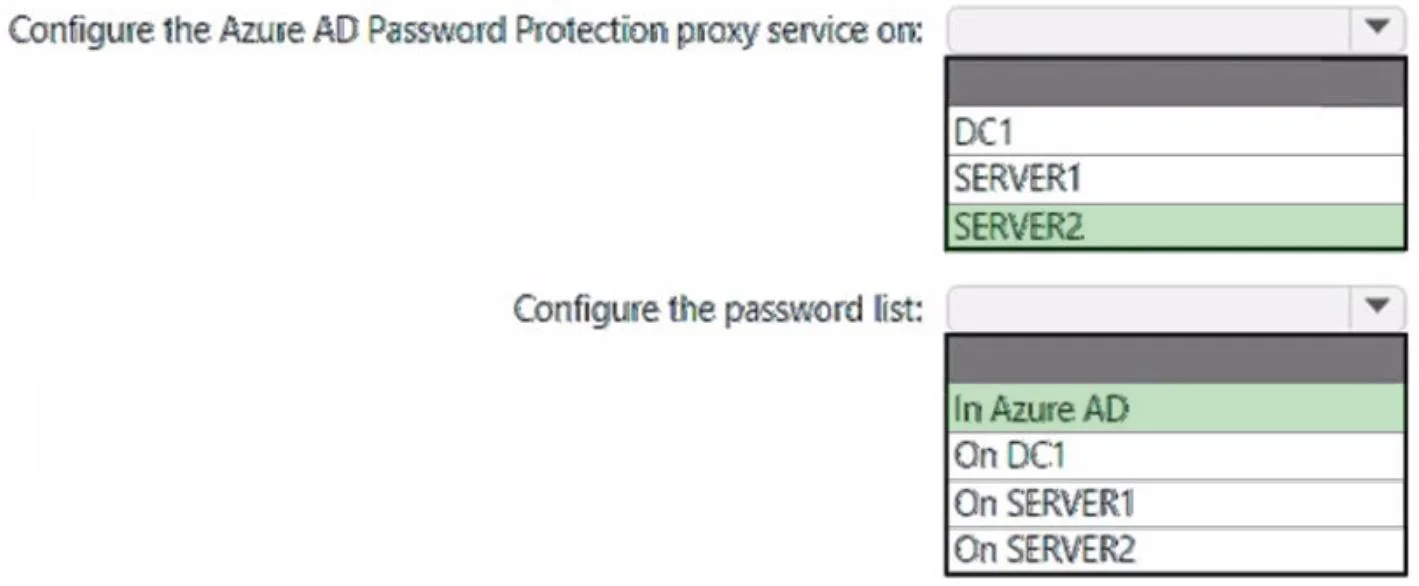
How should the access be setup to the on-premises applications? To answer, select the appropriate options in the answer area. NOTE: Each correct selection is worth one point. Answer:

The correct answer is Configure the Azure AD Password Protection proxy service on:: SERVER2; Configure the password list:: In Azure AD. This case study hotspot tests your understanding of Azure AD Connect authentication modes and their impact on available security features, particularly how disabling password hash synchronization limits certain Azure AD Identity Protection and Microsoft Cloud App Security…

Submitted by rohit_dlh· Mar 6, 2026Implement authentication and access management
Case Study ScenarioShared context for this question
Case Study 2 - Litware, Inc Overview Litware, Inc. is a pharmaceutical company that has a subsidiary named Fabrikam, Inc. Litware has offices in Boston and Seattle, but has employees located across the United States. Employees connect remotely to either office by using a VPN connection. Existing Environment. Identify Environment The network contains an Active Directory forest named litware.com that is linked to an Azure Active Directory (Azure AD) tenant named litware.com. Azure AD Connect uses pass-through authentication and has password hash synchronization disabled. Litware.com contains a user named User1 who oversees all application development. Litware implements Azure AD Application Proxy. Fabrikam has an Azure AD tenant named fabrikam.com. The users at Fabrikam access the resources in litware.com by using guest accounts in the litware.com tenant. Existing Environment. Cloud Environment All the users at Litware have Microsoft 365 Enterprise E5 licenses. All the built-in anomaly detection policies in Microsoft Cloud App Security are enabled. Litware has an Azure subscription associated to the litware.com Azure AD tenant. The subscription contains an Azure Sentinel instance that uses the Azure Active Directory connector and the Office 365 connector. Azure Sentinel currently collects the Azure AD sign-ins logs and audit logs. Existing Environment. On-premises Environment The on-premises network contains the servers shown in the following table. Both Litware offices connect directly to the internet. Both offices connect to virtual networks in the Azure subscription by using a site-to-site VPN connection. All on-premises domain controllers are prevented from accessing the internet. Requirements. Delegation Requirements Litware identifies the following delegation requirements: Delegate the management of privileged roles by using Azure AD Privileged Identity Management (PIM). Prevent nonprivileged users from registering applications in the litware.com Azure AD tenant. Use custom catalogs and custom programs for Identity Governance. Ensure that User1 can create enterprise applications in Azure AD. Use the principle of least privilege. Requirements. Licensing Requirements Litware recently added a custom user attribute named LWLicenses to the litware.com Active Directory forest. Litware wants to manage the assignment of Azure AD licenses by modifying the value of the LWLicenses attribute. Users who have the appropriate value for LWLicenses must be added automatically to a Microsoft 365 group that has the appropriate licenses assigned. Requirements. Management Requirements Litware wants to create a group named LWGroup1 that will contain all the Azure AD user accounts for Litware but exclude all the Azure AD guest accounts. Requirements. Authentication Requirements Litware identifies the following authentication requirements: Implement multi-factor authentication (MFA) for all Litware users. Exempt users from using MFA to authenticate to Azure AD from the Boston office of Litware. Implement a banned password list for the litware.com forest. Enforce MFA when accessing on-premises applications. Automatically detect and remediate externally leaked credentials. Requirements. Access Requirements Litware identifies the following access requirements: Control all access to all Azure resources and Azure AD applications by using conditional access policies. Implement a conditional access policy that has session controls for Microsoft SharePoint Online. Control privileged access to applications by using access reviews in Azure AD. Requirements. Monitoring Requirements Litware wants to use the Fusion rule in Azure Sentinel to detect multi-staged attacks that include a combination of suspicious Azure AD sign-ins followed by anomalous Microsoft Office 365 activity.

Question

How should the access be setup to the on-premises applications? To answer, select the appropriate options in the answer area. NOTE: Each correct selection is worth one point. Answer:

Exhibit

SC-300 question #173 exhibit

Answer Area

  • Configure the Azure AD Password Protection proxy service on:SERVER2
    DC1SERVER1SERVER2
  • Configure the password list:In Azure AD
    In Azure ADOn DC1On SERVER1On SERVER2

How the community answered

(1 responses)
  • SERVER2|In Azure AD
    100% (1)

Explanation

This case study hotspot tests your understanding of Azure AD Connect authentication modes and their impact on available security features, particularly how disabling password hash synchronization limits certain Azure AD Identity Protection and Microsoft Cloud App Security capabilities.

Approach. The critical detail is that Azure AD Connect uses pass-through authentication (PTA) with password hash synchronization (PHS) explicitly DISABLED. This matters because several security features require PHS to function: leaked credential detection in Azure AD Identity Protection cannot work without password hashes being synced to the cloud. For any hotspot row asking whether a feature like 'leaked credentials report' or 'risky sign-ins based on credential checks' is available, the answer is No because PHS is off. Features that DO work with PTA alone (like Conditional Access, MFA, sign-in risk based on behavioral signals) should be marked Yes. Guest accounts from fabrikam.com are governed by the litware.com tenant policies, so cross-tenant access controls apply to them as well.

Concept tested. Azure AD Connect authentication method trade-offs: Pass-Through Authentication vs Password Hash Synchronization, and specifically which Identity Protection and MCAS features are unavailable when PHS is disabled (e.g., leaked credential detection requires hashes in the cloud).

Reference. https://learn.microsoft.com/en-us/azure/active-directory/hybrid/whatis-phs#what-are-the-advantages-of-implementing-password-hash-synchronization

Topics

#Azure AD Password Protection#banned password list#proxy service#on-premises integration

Community Discussion

No community discussion yet for this question.

Full SC-300 Practice