
SC-300 · Question #172
Hotspot Question You have a Microsoft 365 E5 subscription. You create an access review for Azure Active Directory (Azure AD) roles. You need to ensure that users who do not respond to review…
The correct answer is Auto apply results to resource: Enable; If reviewers don't respond: Remove access. This question tests knowledge of Azure AD Access Reviews auto-remediation settings, specifically how to configure automatic removal of non-responsive users from roles without manual administrator intervention.
Question
Exhibit
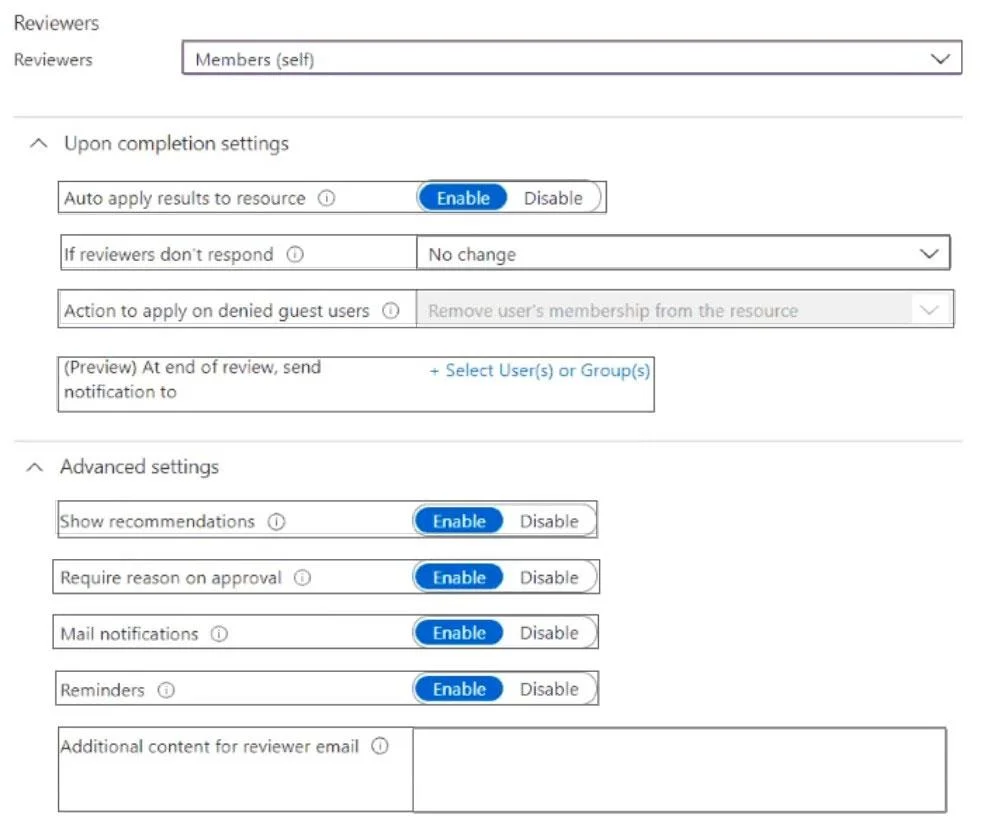
Answer Area
- Auto apply results to resourceEnableEnableDisable
- If reviewers don't respondRemove accessNo changeTake recommendationsRemove access
How the community answered
(1 responses)- Disable|Remove access100% (1)
Explanation
This question tests knowledge of Azure AD Access Reviews auto-remediation settings, specifically how to configure automatic removal of non-responsive users from roles without manual administrator intervention.
Approach. The two settings to modify are: (1) 'Auto apply results to resource' - enable this to automatically apply review decisions without requiring an admin to manually process results; and (2) 'If reviewers don't respond' - set this to 'Remove access', which ensures users who do not respond to the review request are automatically removed from the role. Together these settings create a fully automated remediation workflow that requires zero administrative follow-up.
Concept tested. Azure AD Privileged Identity Management (PIM) Access Reviews - specifically the auto-apply and non-response handling settings that control what happens when reviewers fail to act within the review period.
Reference. https://learn.microsoft.com/en-us/azure/active-directory/governance/create-access-review
Topics
Community Discussion
No community discussion yet for this question.