
SC-300 · Question #174
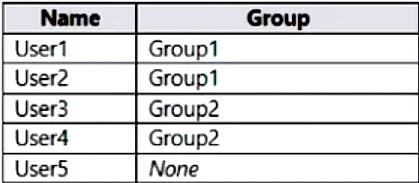
You have an Azure Active Directory (Azure AD) tenant that contains the users shown in the following table. You have an administrative unit named Au1. Group1, User2, and User3 are members of Au1…
The correct answer is D. User2 and User3 only. Adding a group to an administrative unit brings the group itself into the management scope of the administrative unit, but not the members of the group. In other words, an administrator scoped to the administrative unit can manage properties of the group, such as group name or…
Question
You have an Azure Active Directory (Azure AD) tenant that contains the users shown in the following table. You have an administrative unit named Au1. Group1, User2, and User3 are members of Au1. User5 is assigned the User administrator role for Au1. For which users can User5 reset passwords?
Exhibit
Options
- AUser1, User2, and User3
- BUser1 and User2 only
- CUser3 and User4 only
- DUser2 and User3 only
How the community answered
(62 responses)- A5% (3)
- B10% (6)
- C2% (1)
- D84% (52)
Explanation
Adding a group to an administrative unit brings the group itself into the management scope of the administrative unit, but not the members of the group. In other words, an administrator scoped to the administrative unit can manage properties of the group, such as group name or membership, but they cannot manage properties of the users or devices within that group (unless those users and devices are separately added as members of the administrative unit). https://learn.microsoft.com/en-us/azure/active-directory/roles/administrative-units
Topics
Community Discussion
No community discussion yet for this question.