
SC-300 · Question #175
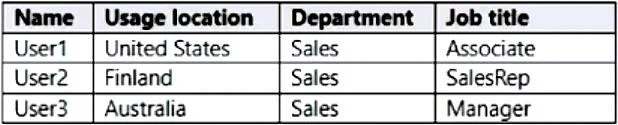
You have an Azure Active Directory (Azure AD) tenant that contains the users shown in the following table. You create a dynamic user group and configure the following rule syntax. user.usageLocation…
The correct answer is A. User1 only. user.usageLocation -in ["US","AU"] == User 1 & User 3 -and (user.department -eq "Sales") == User 1 & User 3 -and -not (user.jobTitle -eq "Manager") == User 1 –or (user. jobTitle -eq "SalesRep")
Question
You have an Azure Active Directory (Azure AD) tenant that contains the users shown in the following table. You create a dynamic user group and configure the following rule syntax. user.usageLocation -in ["US","AU"] -and (user.department -eq "Sales") -and -not (user.jobTitle - eq "Manager") –or (user. jobTitle -eq "SalesRep") Which users will be added to the group?
Exhibit
Options
- AUser1 only
- BUser2 only
- CUser3 only
- DUser1 and User2 only
- EUser1 and User3 only
- FUser1, User2, and User3
How the community answered
(19 responses)- A84% (16)
- D5% (1)
- E5% (1)
- F5% (1)
Explanation
user.usageLocation -in ["US","AU"] == User 1 & User 3 -and (user.department -eq "Sales") == User 1 & User 3 -and -not (user.jobTitle -eq "Manager") == User 1 –or (user. jobTitle -eq "SalesRep")
Topics
Community Discussion
No community discussion yet for this question.