
SC-300 · Question #47
Hotspot Question You have an Azure Active Directory (Azure AD) tenant that has Security defaults disabled. You are creating a conditional access policy as shown in the following exhibit. Use the…
The correct answer is Include: Select users and groups; Enable policy: On. This hotspot question tests understanding of Azure AD Conditional Access policy behavior, specifically how policy assignments (users, cloud apps, conditions) and access controls (grant/session) interact to determine when and how the policy is enforced.
Question
Exhibit
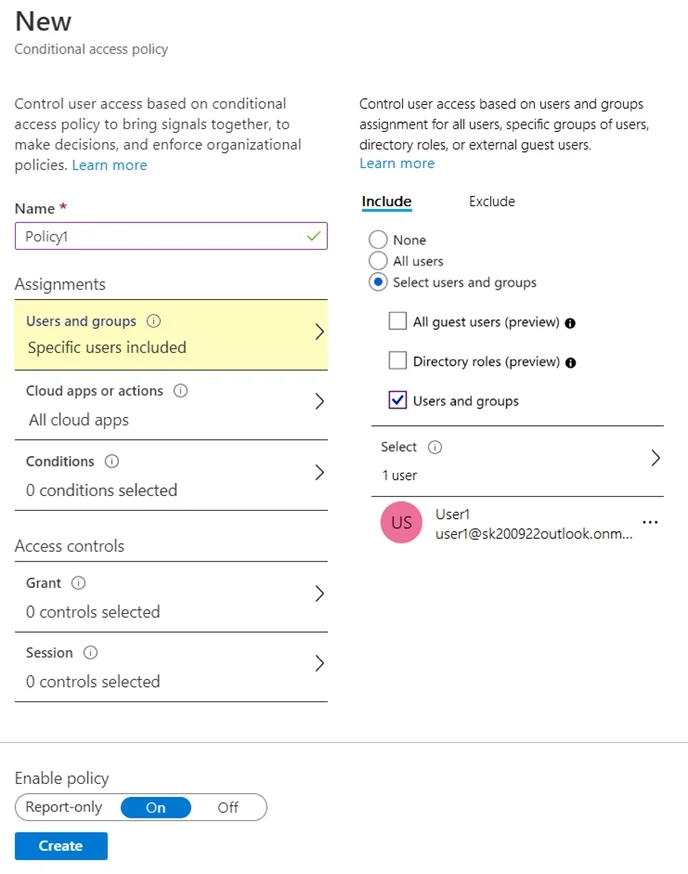
Answer Area
- IncludeSelect users and groupsNoneAll usersSelect users and groups
- Enable policyOnReport-onlyOnOff
Explanation
This hotspot question tests understanding of Azure AD Conditional Access policy behavior, specifically how policy assignments (users, cloud apps, conditions) and access controls (grant/session) interact to determine when and how the policy is enforced.
Approach. In a typical Conditional Access policy exhibit scenario, the key concepts are: (1) The policy applies to the specified users/groups under 'Assignments > Users and groups', so if a user is excluded or not included, the policy does NOT apply to them. (2) Under 'Cloud apps or actions', if 'All cloud apps' is selected, the policy covers every app including the Azure portal and Microsoft 365 services. (3) Under 'Grant', if 'Require multi-factor authentication' is selected, users meeting the assignment conditions will be prompted for MFA. (4) If the policy is set to 'Report-only' mode rather than 'On', the policy is evaluated and logged but NOT enforced - users are not actually blocked or prompted. The correct answers depend on these rules: a user included in the policy targeting all cloud apps with MFA grant and policy set to 'On' WILL be required to perform MFA; a user excluded from the policy or whose app is not targeted will NOT be affected; and if the policy is in Report-only mode, no enforcement occurs despite evaluation.
Concept tested. Azure AD Conditional Access policy configuration - understanding how user assignments, cloud app targeting, grant controls (MFA requirement), and policy enforcement state (On vs. Report-only vs. Off) determine whether and how a policy is applied to specific users and sign-in scenarios.
Reference. https://learn.microsoft.com/en-us/azure/active-directory/conditional-access/overview
Topics
Community Discussion
No community discussion yet for this question.