
SC-300 · Question #48
Hotspot Question You have a Microsoft 365 tenant. Sometimes, users use external, third-party applications that require limited access to the Microsoft 365 data of the respective user. The users…
The correct answer is Tool to use:: Microsoft Defender for Cloud Apps; Policy type to create:: OAuth app. This question tests your knowledge of configuring Microsoft Defender for Cloud Apps (formerly MCAS) app governance policies to detect when registered Azure AD applications gain excessive permissions to users' mailboxes.
Question
Exhibit
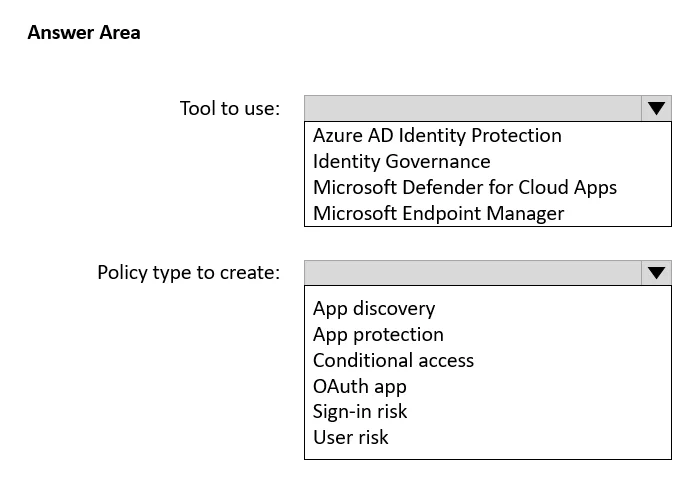
Answer Area
- Tool to use:Microsoft Defender for Cloud AppsAzure AD Identity ProtectionIdentity GovernanceMicrosoft Defender for Cloud AppsMicrosoft Endpoint Manager
- Policy type to create:OAuth appApp discoveryApp protectionConditional accessOAuth appSign-in riskUser risk
How the community answered
(1 responses)- Microsoft Endpoint Manager|OAuth app100% (1)
Explanation
This question tests your knowledge of configuring Microsoft Defender for Cloud Apps (formerly MCAS) app governance policies to detect when registered Azure AD applications gain excessive permissions to users' mailboxes.
Approach. To receive an alert when a registered application gains read and write access to users' email, you should use Microsoft Defender for Cloud Apps (Microsoft Defender for Cloud Apps > App governance or Cloud App Security). Specifically, you need to create an App policy under App governance that monitors OAuth apps registered in Azure AD. You would configure the policy to trigger when an app requests or is granted Mail.ReadWrite (or similar Mail permissions) scopes, and set the action to generate an alert. This leverages App Governance's ability to track OAuth application permissions and alert administrators when suspicious or high-risk permission scopes - such as full mailbox read/write - are granted to third-party registered applications.
Concept tested. The core concept tested is Microsoft Defender for Cloud Apps App Governance (OAuth app policies), which monitors third-party OAuth applications registered in Azure AD for excessive or sensitive permission scopes such as Mail.ReadWrite. Administrators must understand how to create policy-based alerts triggered by specific OAuth permission grants to protect organizational data from over-privileged third-party apps.
Reference. https://learn.microsoft.com/en-us/defender-cloud-apps/app-governance-app-policies-overview
Topics
Community Discussion
No community discussion yet for this question.