
PL-900 · Question #372
You are editing an existing Power Automate cloud flow. Every day, the flow adds a list of tasks to Microsoft Planner for each email received in a complaints mailbox. The flow then sends a message to…
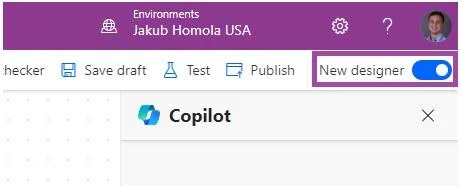
The correct answer is D. Save the flow. If you open the editing of a cloud flow that you created from a solution (solution-aware cloud flows), you have the following buttons available: Save a draft of a flow whenever you want, even with errors. Make changes to your flow with confidence at your own pace. When you're…
Question
Exhibit
Options
- AAdd parameters to the action.
- BTurn the flow on.
- CCreate a connection.
- DSave the flow.
How the community answered
(45 responses)- A4% (2)
- B7% (3)
- C18% (8)
- D71% (32)
Explanation
If you open the editing of a cloud flow that you created from a solution (solution-aware cloud flows), you have the following buttons available: Save a draft of a flow whenever you want, even with errors. Make changes to your flow with confidence at your own pace. When you're ready for changes to a flow to have an effect at runtime, the flow can be published. The state of the flow (Draft or Published) shows beside the flow title to indicate if that version of the flow was published, or if the flow has draft changes.
Community Discussion
No community discussion yet for this question.