
PL-300 · Question #89
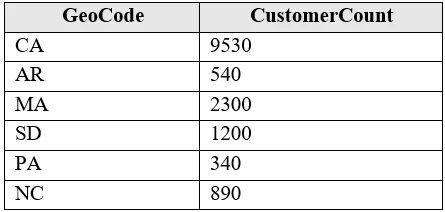
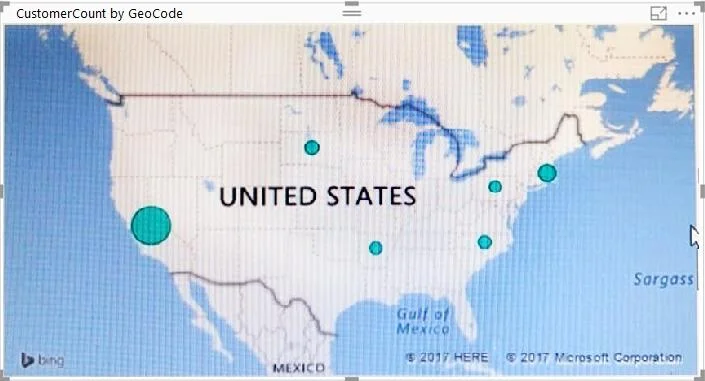
You have the following table named Location. The GeoCode column represents the country where each customer is located. You create a map visualization as shown in the exhibit. (Click the Exhibit…
The correct answer is B. Change the name of the GeoCode column to Country. Power BI infers geographic meaning from both the column name and its Data Category setting. A column named 'GeoCode' gives Power BI no semantic hint about the geographic level. Renaming it to 'Country' allows Power BI's geocoding engine to interpret the values as country names…
Question
You have the following table named Location. The GeoCode column represents the country where each customer is located. You create a map visualization as shown in the exhibit. (Click the Exhibit tab.) You need to ensure that the map displays the country locations. What should you do?
Exhibits
Options
- AReplace the values in the GeoCode column with postal codes or zip codes.
- BChange the name of the GeoCode column to Country.
- CChange the name of the Location table to Country.
- DChange the Default Summarization of the GeoCode column.
- EAdd a Geoportal column to the Location table.
- FChange the Data Type of the GeoCode column.
How the community answered
(23 responses)- A4% (1)
- B91% (21)
- E4% (1)
Explanation
Power BI infers geographic meaning from both the column name and its Data Category setting. A column named 'GeoCode' gives Power BI no semantic hint about the geographic level. Renaming it to 'Country' allows Power BI's geocoding engine to interpret the values as country names or codes and plot them correctly on the map. Ideally you would also set the Data Category to 'Country or Region,' but changing the column name is the actionable step listed. Changing the Data Type or Default Summarization would not help with geographic interpretation.
Topics
Community Discussion
No community discussion yet for this question.