
PL-300 · Question #35
You have a report that contains four pages. Each page contains slicers for the same four fields. Users report that when they select values on a slicer on one page, the visuals are not updated on all…
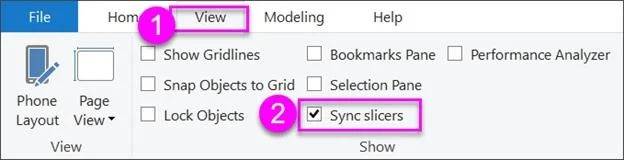
The correct answer is A. Sync the slicers across the pages. E. Replace the slicers with report-level filters. E: Add a report-level filter to filter an entire report. The visuals on the active page, and on all pages in the report, change to reflect the new filter. A: You can sync a slicer and use it on any or all pages in a report. 1. On the Power BI Desktop View menu, select Sync…
Question
You have a report that contains four pages. Each page contains slicers for the same four fields. Users report that when they select values on a slicer on one page, the visuals are not updated on all the pages. You need to recommend a solution to ensure that users can select a value once to filter the results on all the pages. What are two possible recommendations to achieve this goal? Each correct answer presents a complete solution. NOTE: Each correct selection is worth one point.
Exhibit
Options
- ASync the slicers across the pages.
- BReplace the slicers with page-level filters.
- CReplace the slicers with visual-level filters.
- DCreate a bookmark for each slicer value.
- EReplace the slicers with report-level filters.
How the community answered
(44 responses)- A95% (42)
- B2% (1)
- D2% (1)
Explanation
E: Add a report-level filter to filter an entire report. The visuals on the active page, and on all pages in the report, change to reflect the new filter. A: You can sync a slicer and use it on any or all pages in a report. 1. On the Power BI Desktop View menu, select Sync slicers. The Sync slicers pane appears between the Filters and Visualizations panes. https://docs.microsoft.com/en-us/power-bi/create-reports/power-bi-report-add-filter https://docs.microsoft.com/en-us/power-bi/visuals/power-bi-visualization-slicers
Topics
Community Discussion
No community discussion yet for this question.