
PL-300 · Question #34
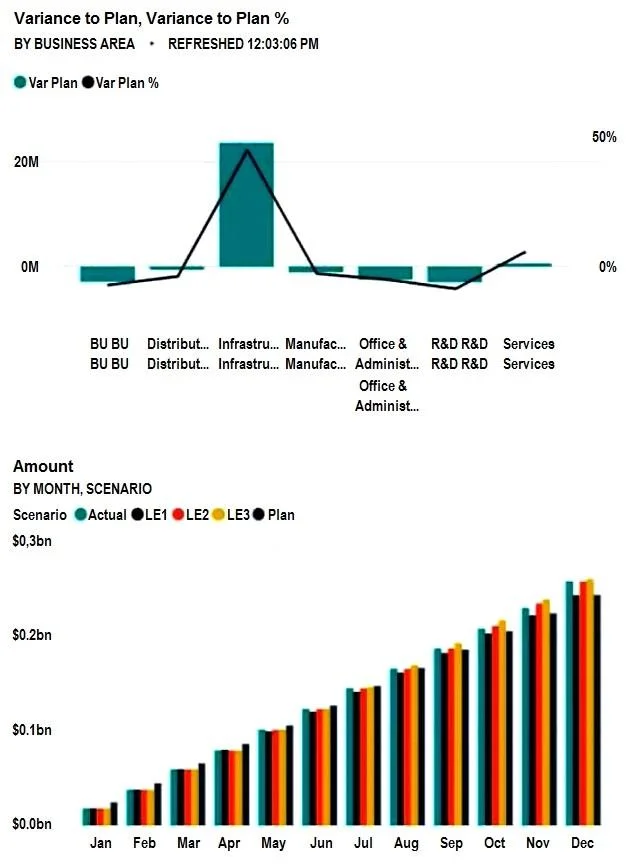
You have a Microsoft Power BI dashboard. The report used to create the dashboard uses an imported dataset from a Microsoft SQL Server data source. The dashboard is shown in the exhibit. What…
The correct answer is D. The dashboard tile cache refreshed. The timestamp '12:03:06 PM' on a Power BI dashboard tile typically indicates when the tile's cached data was last updated, not necessarily when the underlying dataset refreshed or a user interacted with the report.
Question
You have a Microsoft Power BI dashboard. The report used to create the dashboard uses an imported dataset from a Microsoft SQL Server data source. The dashboard is shown in the exhibit. What occurred at 12:03:06 PM?
Exhibit
Options
- AA user pressed F5
- BA new transaction was added to the data source.
- CA user added a comment to a tile.
- DThe dashboard tile cache refreshed.
How the community answered
(41 responses)- A5% (2)
- B2% (1)
- D93% (38)
Why each option
The timestamp '12:03:06 PM' on a Power BI dashboard tile typically indicates when the tile's cached data was last updated, not necessarily when the underlying dataset refreshed or a user interacted with the report.
Pressing F5 refreshes the browser page, which might reload the dashboard, but the tile timestamp specifically refers to the data within the tile's cache, not just a page reload.
A new transaction in the data source would require a dataset refresh and then a tile cache refresh to be reflected, so it is not the direct event represented by the tile's timestamp.
Adding a comment to a tile is a user interaction feature that does not directly cause or is reflected by the tile's data refresh timestamp.
Dashboard tiles in Power BI are cached snapshots of report visuals, and the timestamp on a tile often indicates when its cached data was last updated, rather than when the underlying dataset was refreshed or when a user last interacted with the report.
Concept tested: Power BI dashboard tile caching and refresh
Source: https://learn.microsoft.com/en-us/power-bi/consumer/end-user-dashboards#refreshing-your-dashboard
Topics
Community Discussion
No community discussion yet for this question.