
PL-300 · Question #225
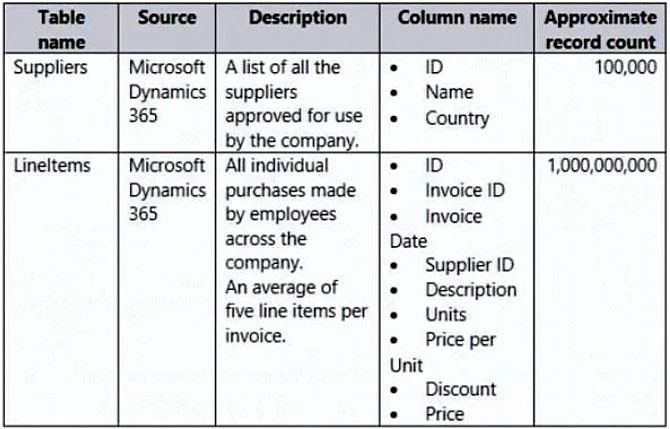
You have a Power Bi report for the procurement department. The report contains data from the following tables. There is a one-to-many relationship from Suppliers to Lineitems that uses the ID and…
The correct answer is D. Remove the Lineitems[Description] column. Removing the Lineitems[Description] column eliminates a high-cardinality text column that is not used in any of the procurement report visuals. Text columns (especially free-form descriptions) consume significant memory in Power BI's in-memory columnar store. Since no visual…
Question
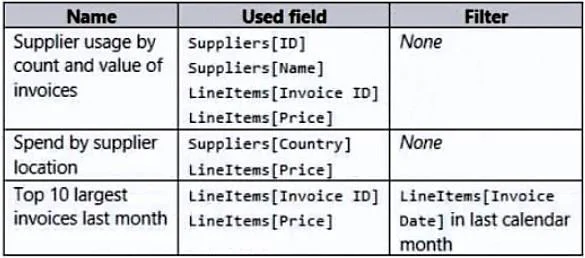
You have a Power Bi report for the procurement department. The report contains data from the following tables. There is a one-to-many relationship from Suppliers to Lineitems that uses the ID and Supplier ID columns. The report contains the visuals shown in the following table. You need to minimize the size of the dataset without affecting the visuals. What should you do?
Exhibits
Options
- ARemove the rows from Lineitems where LineItems[invoice Date] is before the beginning of last
- BMerge Suppliers and Uneltems.
- CGroup Lineltems by Lineitems[ invoice id) and Lineitems[invoice Date) with a sum of
- DRemove the Lineitems[Description] column.
How the community answered
(52 responses)- A15% (8)
- B4% (2)
- C6% (3)
- D75% (39)
Explanation
Removing the Lineitems[Description] column eliminates a high-cardinality text column that is not used in any of the procurement report visuals. Text columns (especially free-form descriptions) consume significant memory in Power BI's in-memory columnar store. Since no visual depends on this column, removing it reduces dataset size without any impact on report accuracy or functionality. Option A would remove historical invoice rows, potentially breaking time-based visuals. Option B (merging tables) would not reduce size and could introduce redundancy. Option C (grouping) might lose invoice-level detail needed by other visuals.
Topics
Community Discussion
No community discussion yet for this question.