
PL-300 · Question #121
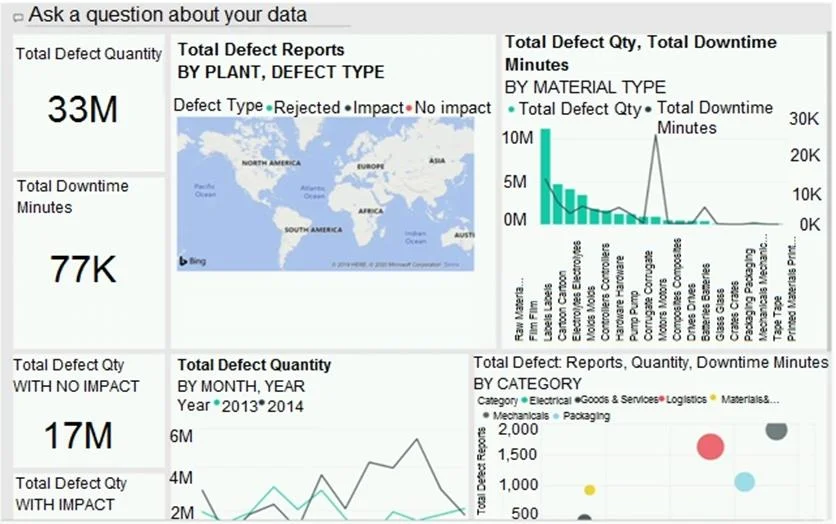
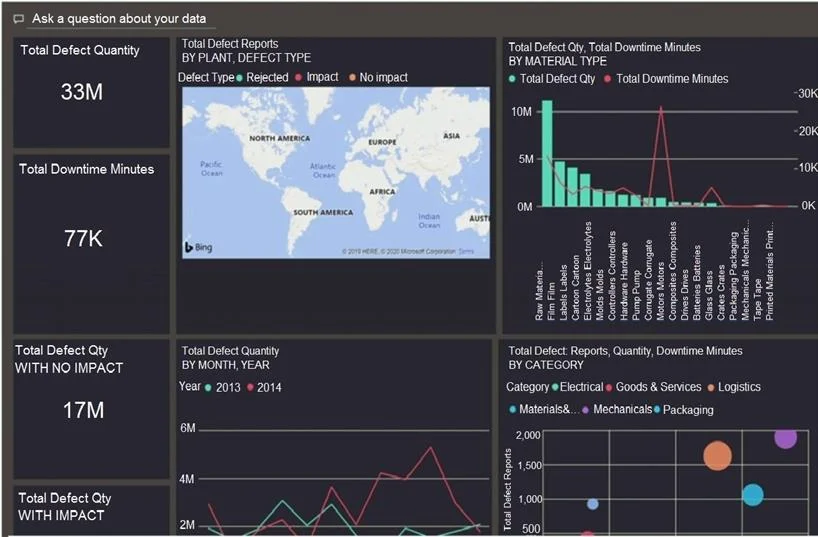
You have a dashboard that contains tiles pinned from a single report as shown in the Original Dashboard exhibit. You need to modify the dashboard to appear as shown in the Modified Dashboard…
The correct answer is C. Change the dashboard theme. Depends on where you apply the theme, if on PBI desktop then the answer is report theme, but when you apply the theme from PBI service the answer is dashboard theme. https://docs.microsoft.com/en-us/power-bi/create-reports/service-dashboard-themes
Question
You have a dashboard that contains tiles pinned from a single report as shown in the Original Dashboard exhibit. You need to modify the dashboard to appear as shown in the Modified Dashboard exhibit. What should you do?
Exhibits
Options
- AEdit the details of each tile.
- BChange the report theme.
- CChange the dashboard theme.
- DCreate a custom CSS file.
How the community answered
(23 responses)- B4% (1)
- C96% (22)
Explanation
Depends on where you apply the theme, if on PBI desktop then the answer is report theme, but when you apply the theme from PBI service the answer is dashboard theme. https://docs.microsoft.com/en-us/power-bi/create-reports/service-dashboard-themes
Topics
Community Discussion
No community discussion yet for this question.