
PL-200 · Question #91
Drag and Drop Question You are configuring Microsoft Dataverse security. You plan to assign users to teams. Record ownership and permissions will differ based on business requirements. You need to…
The correct answer is Azure Active Directory group team for Ability to own records in Dataverse; Access team for Provides permissions without a security role assigned. This question tests the understanding of Microsoft Dataverse team types, specifically differentiating between owner teams (like Azure Active Directory group teams) and access teams based on their record ownership capabilities and permission assignment mechanisms.
Question
Exhibit
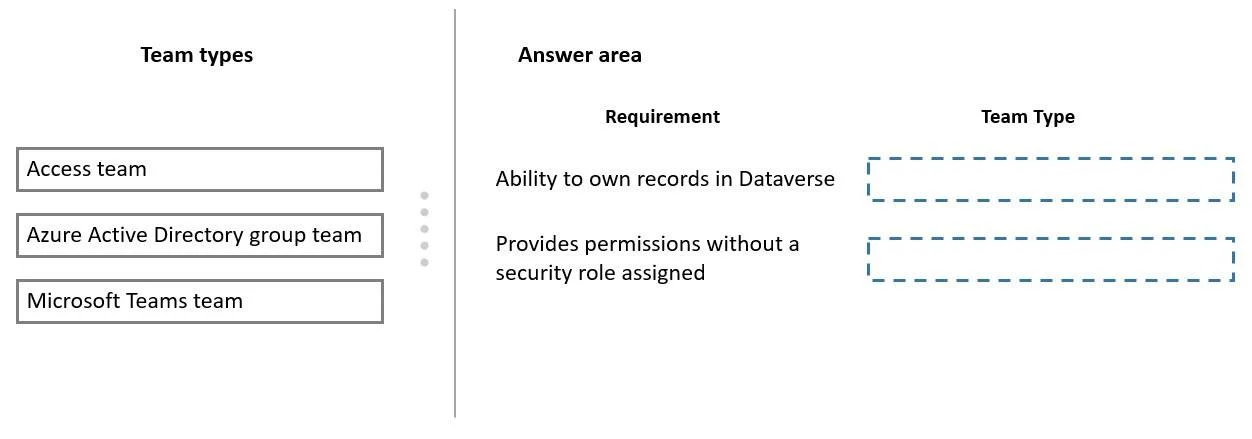
Answer Area
Drag items
Correct arrangement
- Azure Active Directory group team for Ability to own records in Dataverse
- Access team for Provides permissions without a security role assigned
Explanation
This question tests the understanding of Microsoft Dataverse team types, specifically differentiating between owner teams (like Azure Active Directory group teams) and access teams based on their record ownership capabilities and permission assignment mechanisms.
Approach. To correctly answer the question, the test-taker must drag 'Azure Active Directory group team' to the 'Ability to own records in Dataverse' requirement and 'Access team' to the 'Provides permissions without a security role assigned' requirement. Azure Active Directory group teams, when integrated with Dataverse, function as owner teams and can indeed own records. All members of an owner team inherit the privileges defined by the security roles assigned to that team. Conversely, Access teams are specifically designed to grant permissions to a group of users for particular records without needing a security role assigned directly to the team. Instead, permissions are granted through an Access Team Template, making them suitable for scenarios where granular, record-specific access is needed without the overhead of assigning security roles.
Common mistakes.
- common_mistake. A common mistake would be to drag 'Access team' to 'Ability to own records in Dataverse'. Access teams are explicitly designed to not own records; their purpose is for sharing specific records. Another incorrect choice would be dragging 'Azure Active Directory group team' or 'Microsoft Teams team' to 'Provides permissions without a security role assigned'. Both Azure AD group teams and Microsoft Teams teams (when acting as owner teams in Dataverse) require security roles to be assigned to them to define their base permissions, unlike Access teams. 'Microsoft Teams team' is a specific instance of an Azure Active Directory group team and, in the context of Dataverse ownership, would function similarly to an Azure AD group team, requiring security roles if it were to own records.
Concept tested. Microsoft Dataverse security model, specifically the characteristics and distinctions between different team types (Owner teams, Access teams, Azure Active Directory group teams, and their security implications regarding record ownership and permission management via security roles versus access team templates.
Reference. null
Topics
Community Discussion
No community discussion yet for this question.