
PL-200 · Question #309
Drag and Drop Question A company has implemented server-side synchronization in Dataverse. Users have the following synchronization requirements: - As emails are moved to specific locations within…
The correct answer is Folder-level tracking; Email synchronization; Appointments, contacts, and tasks synchronization. This question tests knowledge of specific Dataverse server-side synchronization features that enable granular control over email, contact, appointment, and task synchronization with Outlook.
Question
Exhibit
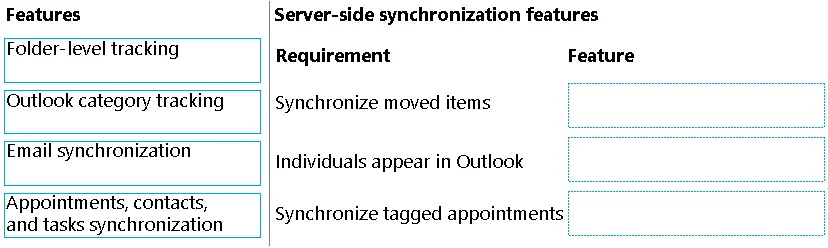
Answer Area
Drag items
Correct arrangement
- Folder-level tracking
- Email synchronization
- Appointments, contacts, and tasks synchronization
Explanation
This question tests knowledge of specific Dataverse server-side synchronization features that enable granular control over email, contact, appointment, and task synchronization with Outlook.
Approach. The correct approach involves matching each specific synchronization requirement to the Dataverse server-side synchronization feature designed to address it:
-
Requirement: 'As emails are moved to specific locations within an inbox, the emails must relate back to a specific record in Dataverse.'
- Correct Feature: 'Folder-level tracking'
- Reasoning: Folder-level tracking allows users to configure specific Outlook folders to track emails against a particular Dataverse record (e.g., an account, an opportunity). When an email is moved to such a folder, it is automatically tracked against the associated Dataverse record.
-
Requirement: 'Information about key individuals must sync automatically to Outlook.'
- Correct Feature: 'Appointments, contacts, and tasks synchronization'
- Reasoning: This feature encompasses the bi-directional synchronization of contacts (representing key individuals), appointments, and tasks between Dataverse and Outlook. It ensures that contact information created or updated in Dataverse appears in Outlook, and vice versa.
-
Requirement: 'Tagged appointments in Outlook must sync automatically to Dataverse.'
- Correct Feature: 'Outlook category tracking'
- Reasoning: Outlook category tracking allows users to assign a specific Outlook category (e.g., 'Tracked to Dynamics 365') to an appointment, contact, or task. When this category is applied, the item is automatically synchronized and tracked in Dataverse.
Common mistakes.
- common_mistake. A common mistake would be to use 'Email synchronization' for any of the specific requirements. While 'Email synchronization' is the overarching capability that enables email-related features, it is too general to fulfill the specific, granular requirements for 'moved items' or 'tagged appointments'. The question asks for specific 'features' for distinct requirements, and 'Folder-level tracking' and 'Outlook category tracking' are the precise features for email movement and tagged items, respectively. Using 'Email synchronization' would be like answering 'transportation' when asked for 'car' or 'bicycle' for specific travel needs. Another mistake might be confusing 'Outlook category tracking' with 'Folder-level tracking' for email movements, but categories are for tagging individual items, while folders are for organizing groups of items by destination.
Concept tested. Microsoft Dataverse server-side synchronization features and their specific application for integrating emails, appointments, contacts, and tasks between Dataverse and Microsoft Outlook.
Topics
Community Discussion
No community discussion yet for this question.